Why I Started Here
This article is the first entry in my “build a shogi AI from scratch” project.
This article explains why you should build a GUI first when developing a shogi AI in Python.
This GUI is implemented in Python using Tkinter.
When you try to build a shogi AI, one of the first questions is: “What should I build first?”
Reinforcement learning, search, and evaluation functions are the obvious candidates. But before any of that, it is extremely useful to have a way to confirm that the board is actually behaving correctly.
In this article, I explain why I decided to build the GUI first, before diving into reinforcement learning, as the first practical step toward a Python shogi AI.
Eventually, I want to build a shogi AI with reinforcement learning.
But if I start running training immediately, it becomes hard to verify:
- whether the board state is updating correctly
- whether legal move generation is broken
- whether promotion and pieces in hand are handled correctly
- whether the search results even look reasonable
You can inspect logs, of course, but in a game with as many rules as shogi, being able to see the board directly is much faster. So as the first step in this project, I built a shogi GUI first.
The Final Goal: A Reinforcement Learning Shogi AI
In my current ML-shogi project, the goal is not just “make a program that can play shogi.”
The broader plan is:
- Represent shogi rules directly in code
- Convert board states into features
- Collect
(state, policy, value)data through self-play - Train policy and value networks from that data
- Combine them with search to produce a playable AI
In that sense, this GUI is not the final product. It is closer to an observation tool for validating the training foundation by hand.
Why I Built the GUI First for Shogi AI Development
When working on reinforcement learning code, the bottleneck is not only the learning algorithm itself.
- bugs in legal move generation
- missing edge cases in promotion or pawn-drop mate rules
- terminal state handling such as repetition or entering-king declaration
- evaluation or search values pointing in the wrong direction
- obviously strange AI moves that are hard to notice if you only read logs
It is annoying to separate “the model is weak” from “the rules are broken” or “the search is wrong.”
That is why I thought it would be better to build a GUI first, one that shows the board, pieces in hand, last move, evaluation history, and overall game state in one place. It should make later debugging of self-play and training results much easier.
What This Python Shogi GUI Can Do
- display a full 9x9 board
- show pieces in hand for both sides
- allow human vs AI play
- allow AI vs AI auto-play observation
- highlight the last move
- show states such as check, checkmate, and resignation
- display a simple evaluation graph
- switch between
negamaxandMCTS - save games as
.kif
This is what it looks like:
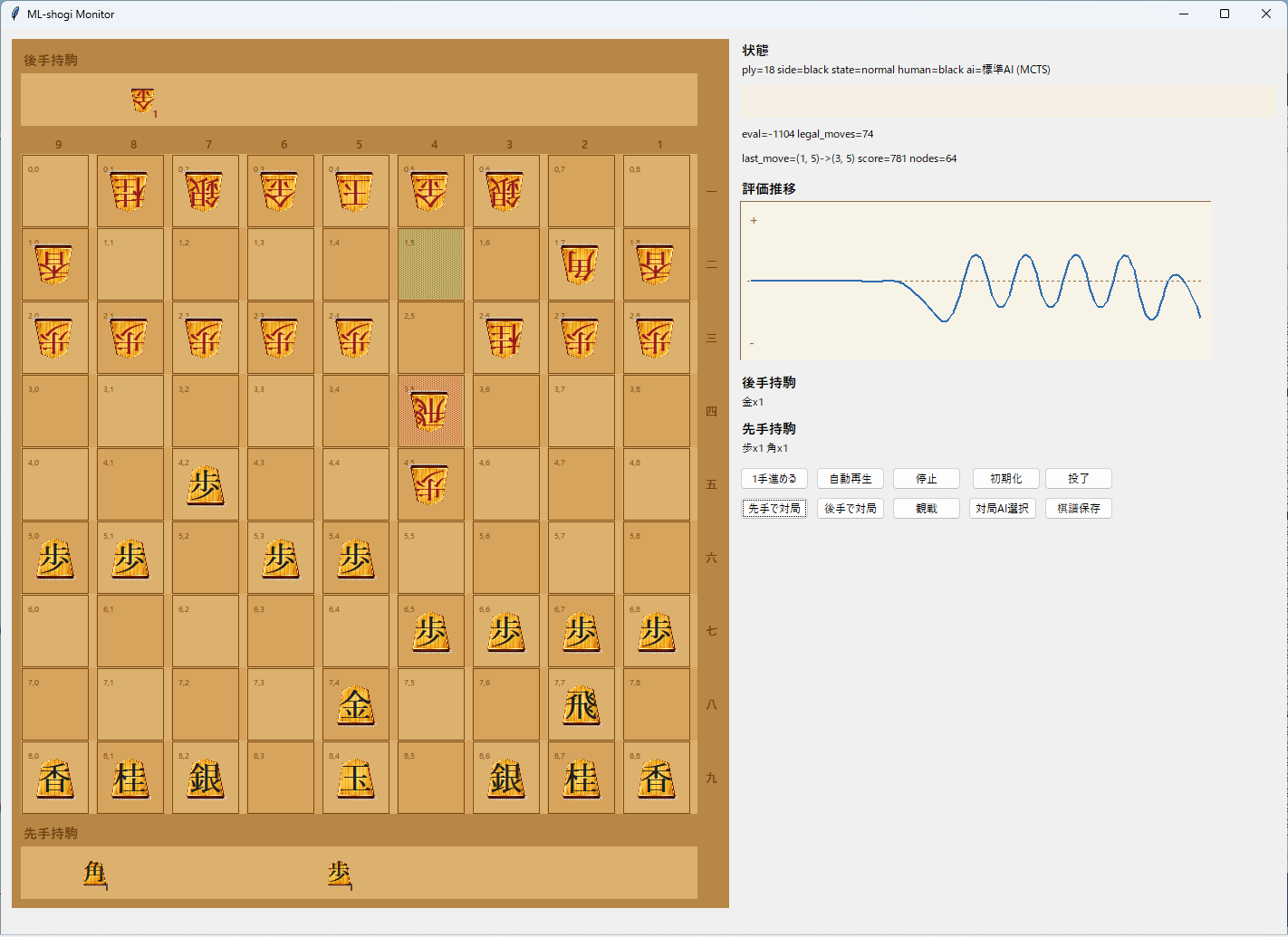
In addition to the board itself, the right side includes status text, evaluation info, pieces in hand, control buttons, and an evaluation history graph. I wanted it to be possible to understand what is happening without reading logs all the time, so I leaned toward a spectator/debugging tool style.
The piece artwork on the board comes from koma.png.

This image was generated with generative AI. I wanted something that looked a bit more like real wooden shogi pieces, but I compromised once it reached a usable state. For checking GUI interactions, it works well enough for now, so I decided to move forward with it.
What I Especially Needed to Verify in the GUI
1. Legal moves should feel intuitive
When the human player clicks a piece, only valid destination squares are shown as candidates. That makes it easy to confirm visually whether a move is really legal in a given position.
Because this also includes piece drops, it is a very practical way to validate the core shogi rule implementation.
The code looks roughly like this. On the GUI side, I directly reuse the legal move generator and turn its output into a set of destination squares.
def _targets_from_square(position: Position, square: tuple[int, int]) -> set[tuple[int, int]]:
    return {
        move.to_square
        for move in generate_legal_moves(position)
        if move.from_square == square
    }
The logic itself is simple: collect only the legal moves that start from the selected square, then extract their destinations. But using the engine’s legal move generator directly in the GUI makes it much less likely that the display and the internal logic will drift apart, which is very helpful in early shogi AI development.
2. Promotion should be testable on the spot
When both promotion and non-promotion are legal, the GUI shows a popup and lets the user choose.
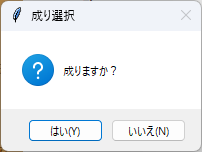
That makes it easy to test whether promotion-zone behavior is implemented correctly. At this stage, these small checks matter a lot more than they may look.
3. Terminal states should be obvious
Checkmate and resignation are displayed clearly so they are hard to miss.
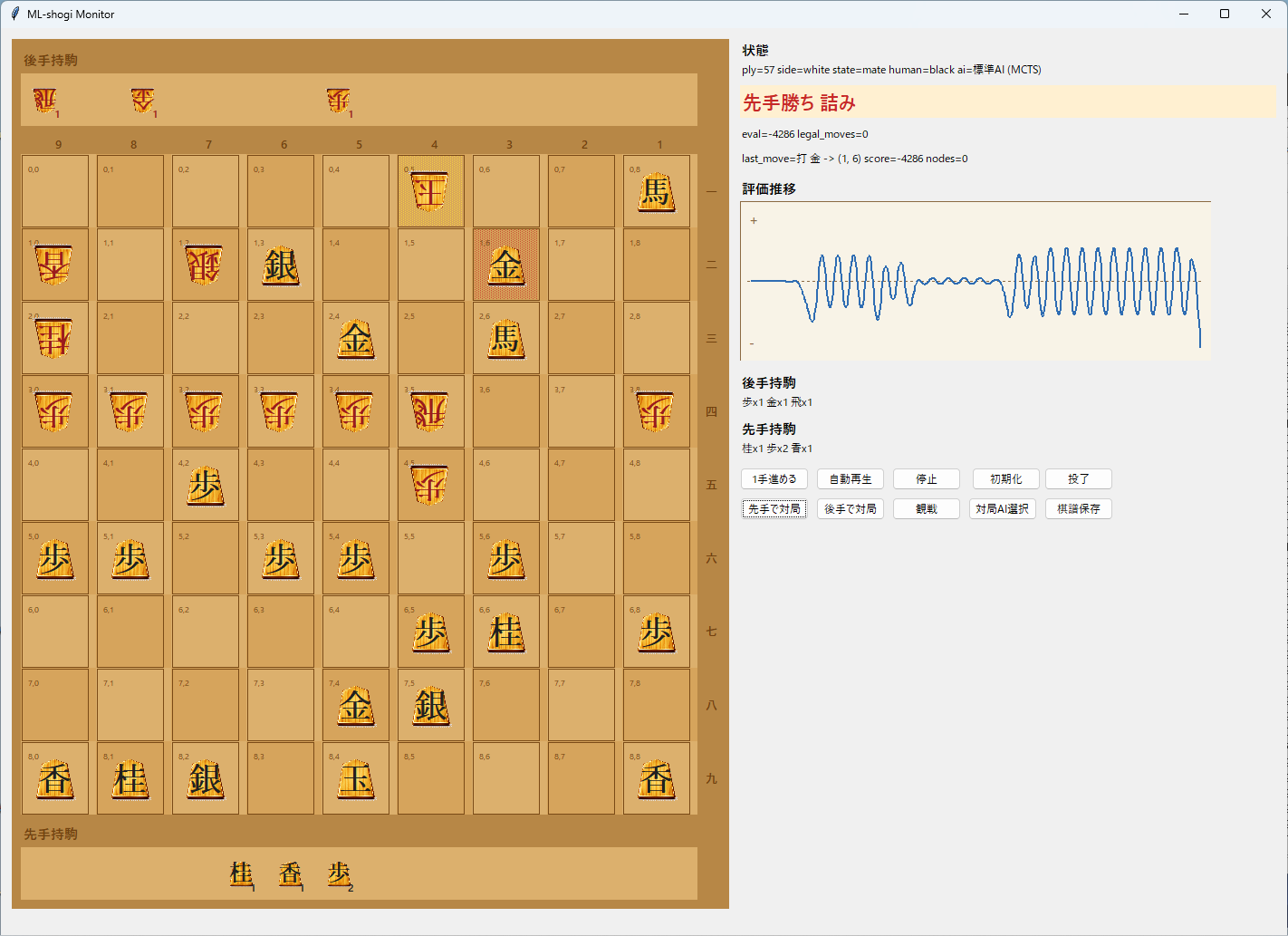
The terminal logic itself lives in the engine, but if the GUI does not show it clearly, it is still hard to tell whether a game really ended correctly. Checkmate, repetition, and entering-king declaration wins are already implemented in the internal logic, so the GUI is mainly there to make those outcomes easy for a human to verify.
The terminal-state code is also fairly direct. It checks entering-king conditions, repetition, whether legal moves remain, and whether the side to move is in check.
def terminal_result(position: Position) -> TerminalResult:
    entering_king = entering_king_declaration_result(position, position.side_to_move)
    if entering_king is not None:
        return entering_king

    if is_repetition(position):
        return TerminalResult(status=TerminalStatus.REPETITION, winner=None)

    legal_moves = generate_legal_moves(position)
    if legal_moves:
        return TerminalResult(status=TerminalStatus.ONGOING, winner=None)

    if is_in_check(position, position.side_to_move):
        return TerminalResult(
            status=TerminalStatus.CHECKMATE,
            winner=position.side_to_move.opponent.value,
        )
    return TerminalResult(status=TerminalStatus.STALEMATE, winner=None)
Being able to confirm this directly in the GUI helps test both sides at once: whether the terminal-state logic is correct, and whether the result is communicated clearly enough to a human user.
The Priority Was Validation, Not Fancy Visuals
This GUI is built with Tkinter. I prioritized development speed and debugging efficiency over visual polish.
Internally, it reuses the same codebase for:
- board state management
- legal move generation
- position evaluation
negamaxsearchMCTS- state transitions for self-play
So this is not just a board display app. It is a frontend designed to remain useful later when checking self-play and training behavior.
Why This Was Useful So Early
- it helps catch weird rule-implementation behavior quickly
- it makes it easier to tell whether weak play comes from the AI itself or from broken search/terminal logic
- it becomes a base for visualizing self-play and training results later
- saved game records make it easier to revisit suspicious positions
As a tool for validating the engine before serious reinforcement learning, it has already been very useful. Simply being able to see what is happening lowers the debugging burden a lot.
What I Want to Add Next
- switch between trained checkpoints from the GUI
- make self-play progress and win rates easier to inspect
- show candidate moves and search counts in addition to evaluation history
- support loading game records
- make it easier for humans to play against models trained through reinforcement learning
Ultimately, I do not want this to end at “I made a shogi GUI.” I want to keep building on top of it until it becomes part of a real self-trained shogi AI.
The next article will focus on writing my own evaluation function and seeing how far I can get without reinforcement learning.
In other words, part two will be: “Build a custom evaluation function and try playing with zero reinforcement learning.”
Beyond that, I want to find out how much training it takes before the AI becomes strong enough that I can no longer beat it myself. I am around shodan level on Shogi Wars, so that is my personal benchmark. I also want to see whether I can realistically train it that far on my own. This time I will not feed it external game records or joseki, so it will almost certainly be a slower and more roundabout path, but that is exactly what makes it interesting.