Note: I bought the X-Smart 3 with my own money. This article was not requested or paid for by the manufacturer. (I’ll review the SMART5 too, so please send me one, QIDI.)
At the end of 2023, I bought QIDI TECH’s compact FDM 3D printer, the X-Smart 3, for ¥49,000 (body only; Japan, late 2023).
It is a small CoreXY machine with an enclosure, and about 3 years later it is still my main 3D printer.
In September 2026, an unannounced QIDI printer called the SMART5 showed up in a filing with the FCC (Federal Communications Commission).
It looks like a compact machine that could succeed the X-Smart 3.
While waiting for the official announcement, I want to sort out what the X-Smart 3 could do, where it gave me trouble, and why I keep using it after about 3 years.
That also makes it clear what I’m hoping for from the SMART5.
Contents
- Conclusion
- X-Smart 3 key specs
- Touch panel and slicer
- Upgrading the hotend to V2.5
- Printing ABS and PPS-GF
- I never ended up using a 0.8 mm nozzle
- Early problems and support
- Blob of death and a warranty replacement
- A failed leveling sensor and support
- What I hope for from the SMART5
- Wrapping up
Conclusion
Here is what I learned from about 3 years of use.
- With the V2.5 hotend upgrade, the X-Smart 3 can print high-performance engineering plastics such as glass-fiber-reinforced polyphenylene sulfide (PPS-GF). In terms of value for money, it’s hard to beat.
- I could print PPS-GF cleanly even without chamber heating.
- PPS-GF is strong, heat resistant, and good value. It’s perfectly usable without annealing.
- QIDI support works by email in English, but replies were fast and the warranty handling was generous.
- The X-Smart 3 has been discontinued and there is no compact successor yet. That’s exactly why I’m looking forward to the SMART5.
X-Smart 3 key specs
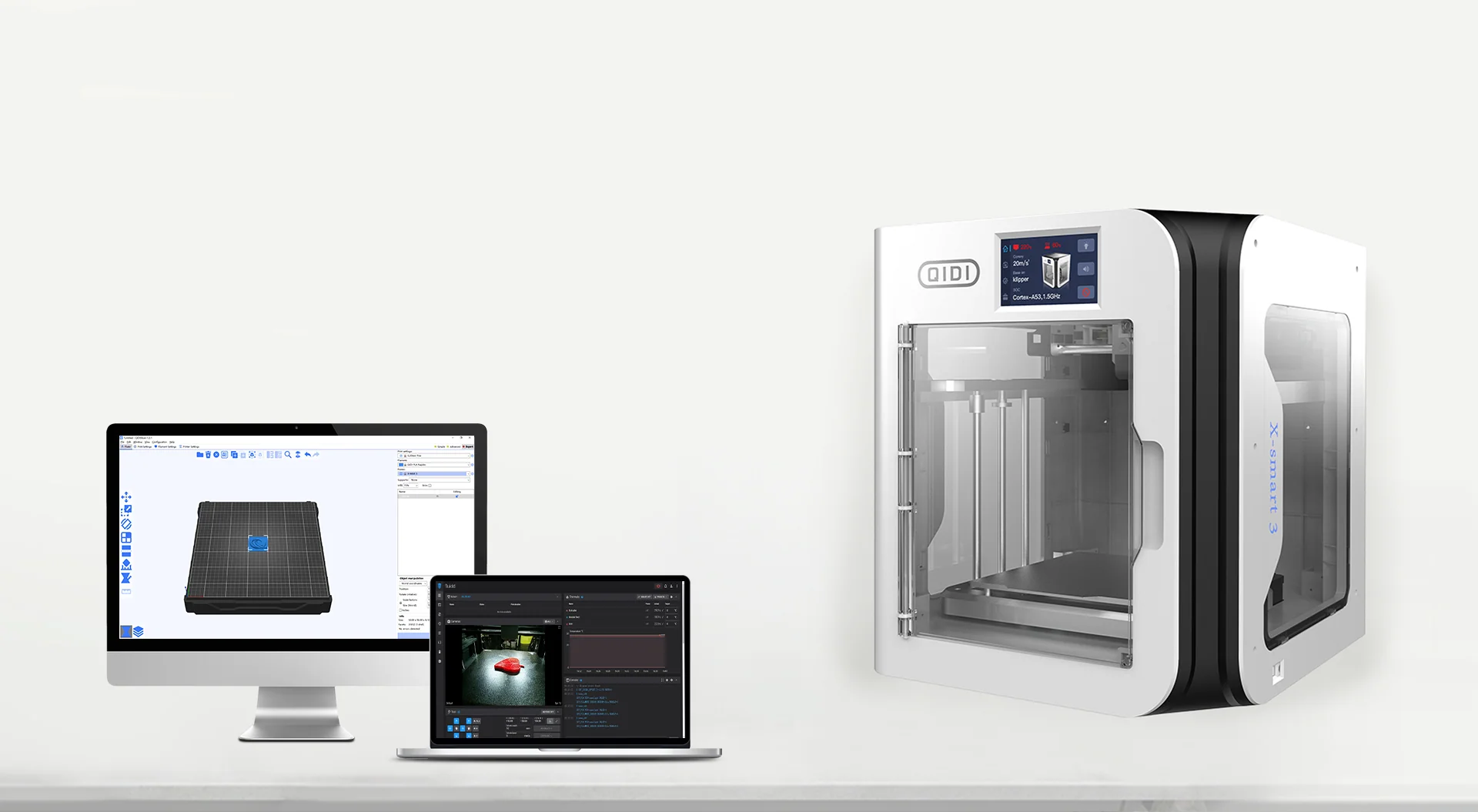
Image source: QIDI official website, “X-SMART3”
The X-Smart 3’s most recognizable feature is its box-shaped enclosure with clear front and side panels.
The panels and frame are ordinary plastic.
First, a quick overview of what kind of 3D printer the X-Smart 3 is.
The table below is based on the manufacturer’s official product page as checked in November 2026.
| Item | Stock | With V2.5 hotend (see below) |
|---|---|---|
| Type | FDM (fused deposition modeling) | Same |
| Motion system | CoreXY | Same |
| Build volume | 175 × 180 × 170 mm | Same |
| Machine size | 370 × 362 × 397 mm | Same |
| Weight | 10.5 kg | Same |
| Hotend heater power | 60 W | 80 W |
| Nozzle | Standard nozzle (0.4 mm) | Bimetal nozzle (0.4 mm, included with V2.5) |
| Max nozzle temperature | 300 °C | 350 °C (not officially listed; used in my setup) |
| Max bed temperature | 120 °C | Same |
| Enclosure | Yes | Same |
| Active chamber heating | No | Same |
The heater power of the V2.5 version comes from QIDI support.
The 350 °C max nozzle temperature isn’t officially listed, but my X-Smart 3 actually runs at up to 350 °C.
All specs other than the hotend stay the same.
What stands out is that, despite being a compact machine, it has an enclosure and a 120 °C max bed temperature.
On the other hand, it has no heater to actively warm the chamber, which is common on recent machines.
This “no heated chamber” condition matters for the material compatibility I discuss later.
For the latest specs, check the X-SMART3 page on QIDI’s official website.
Touch panel and slicer
Here is how the touch panel on the printer and the slicer feel in everyday use.
Touch panel
The touch panel is easy to use.
However, the print screen often doesn’t show the model thumbnail or the remaining time.
This doesn’t affect the print itself, but it makes checking progress less convenient.
My guess is that the printer’s control computer just isn’t powerful enough.
Slicer
With QIDI’s own slicer, QIDI Studio, it feels just like using Bambu Studio, the slicer for Bambu Lab printers.
If you’ve used Bambu Lab products before, you shouldn’t get lost.
Upgrading the hotend to V2.5
I replaced the original hotend in my X-Smart 3 with QIDI’s upgraded V2.5 hotend, which I bought myself.
The V2.5 is QIDI’s official hotend for the X-Max 3, X-Plus 3, and X-Smart 3, and it comes with a 0.4 mm bimetal nozzle.
On the product page of QIDI’s official Japanese store, it was selling for ¥5,500 as of November 2026.
According to QIDI support when I asked, the stock hotend’s heater is 60 W, while the V2.5’s is 80 W.
They explained that the higher heater power makes composite and high-temperature materials easier to handle.
In fact, since the upgrade I’ve been able to use nozzle temperatures up to 350 °C, even though this isn’t officially listed.
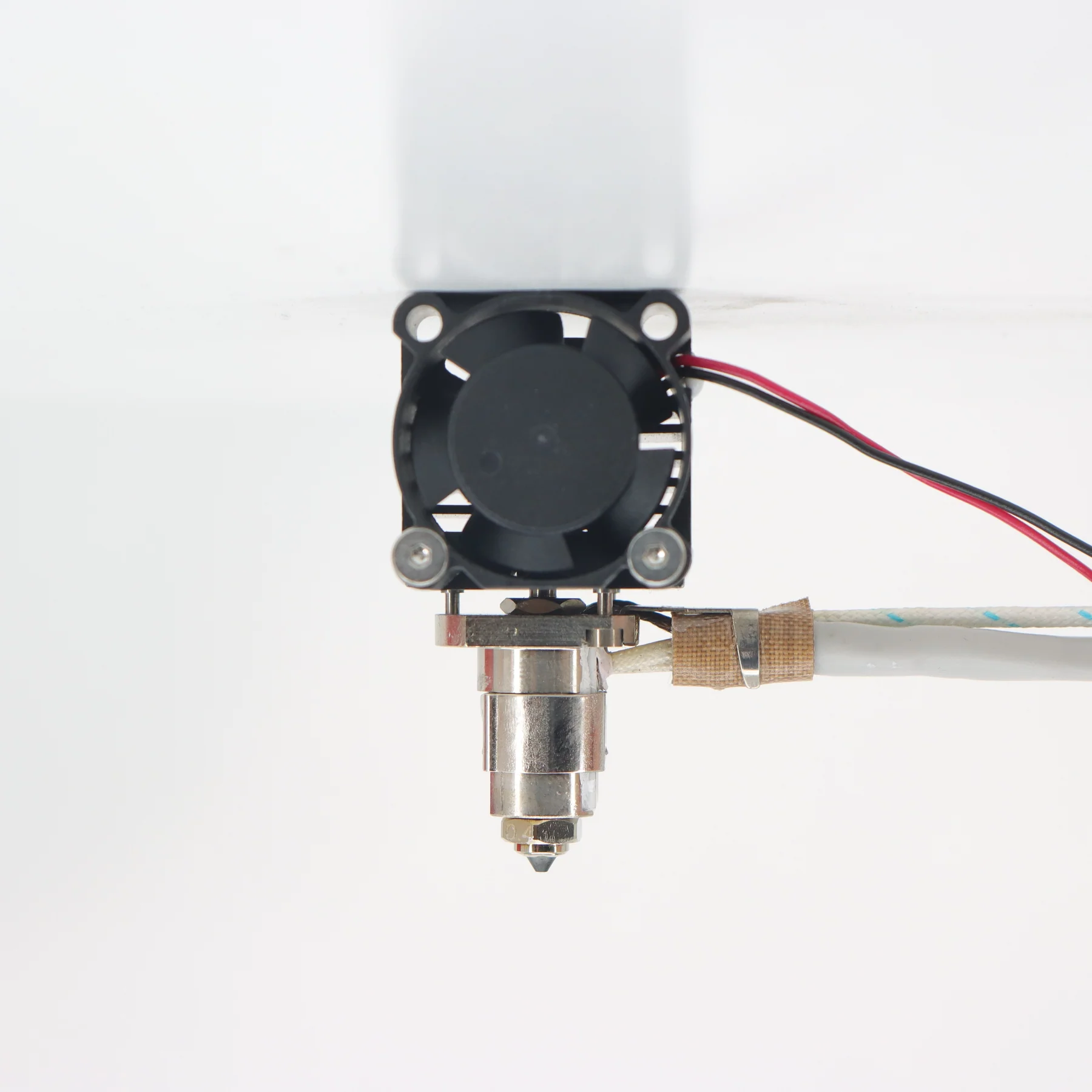
Image source: QIDI JP Store, “Hotend V2.5”
The image above shows the V2.5 hotend, with the heater block and bimetal nozzle below the cooling fan.
The replacement isn’t very difficult.
Roughly, it comes down to three things.
- Open the front cover of the print head
- Remove the screws and mount the new hotend
- Unplug the connectors and plug them back in
For anyone who uses a 3D printer, this shouldn’t be hard. It takes about 10 minutes.
Turn the printer off and wait until the hotend has fully cooled before you start.
The detailed steps are on the X-Smart3 page of the QIDI official wiki, so check it before you begin.
Being able to swap in an official, higher-end hotend is one of the reasons I’ve been able to keep using the X-Smart 3 for so long.
You can widen the range of materials without buying a new printer.
The X-Smart 3 itself is no longer sold, but the V2.5 hotend is still available.
If you own an X-Smart 3, X-Plus 3, or X-Max 3, it’s worth considering.
Printing ABS and PPS-GF
I mostly use ABS and TPU. Since the V2.5 upgrade, I’ve also been printing engineering materials like PPS-GF.
Here’s how each material has gone. All the filament I use is QIDI’s own.
- ABS: Prints fine, but it warps a little, so I add a brim in my setup.
- TPU: Prints without problems. QIDI’s filament has a Shore hardness of 95A (on the firm side).
- PPS-GF: Prints fine. Perhaps because the glass fiber limits shrinkage, it’s stable in my setup even without a brim.
- PA (nylon): I haven’t printed it. PPS-GF has been so good that I’ve never needed it, and managing moisture looks like a hassle, so I haven’t tried it yet. However, I confirmed with QIDI support that PA can be printed with the V2.5 hotend.
Materials filled with glass fiber (GF) or carbon fiber (CF), like PPS-GF, tend to warp less thanks to the fibers.
That said, warping depends on the material and the shape of the part.
PPS-GF isn’t cheap filament, so adding a brim if you’re worried about a failed print is a perfectly reasonable choice.
PPS-GF is a material I recommend
PPS-GF is a material I especially want to recommend.
It’s strong and heat resistant, and while it isn’t cheap, the performance you get makes it good value for money.
PPS-GF prints feel extremely stiff. When bent beyond their limit, they tend to snap rather than flex.
It isn’t suited to parts that need toughness, so use it for parts where you want stiffness and heat resistance.
The manufacturer’s official information says parts should be annealed (heat-treated) after printing.
However, meeting an annealing condition of 130 °C for 10 hours is hard to do at home in the first place.
I tried annealing once, but didn’t feel any dramatic improvement.
That’s not based on measuring strength or heat resistance, just my impression from bending the parts by hand.
You don’t need to go out of your way to anneal it. PPS-GF is perfectly usable without annealing, in my experience.
What I want to emphasize is that the X-Smart 3 has no active chamber heating.
Even so, with the hotend upgrade and tuned print settings, it handles materials like PPS-GF.
For a compact, affordable machine, it’s a far more capable 3D printer than I expected.
I never ended up using a 0.8 mm nozzle
When I first bought the X-Smart 3, I also bought a 0.8 mm nozzle to cut print times.
But QidiSlicer at the time had no profile for a 0.8 mm nozzle, so I had to contact support (more on that in the next section).
After configuring a 0.8 mm nozzle profile in QidiSlicer, I compared the estimated print times. The reduction was much smaller than I had expected.
So I never used the 0.8 mm nozzle for actual prints.
I didn’t compare real prints, so this is a guess, but I think the bottleneck was the maximum volumetric flow, meaning how much plastic the hotend can melt per unit of time.
The volumetric flow of extruded plastic can be roughly expressed as follows.
Q = w × h × v

Q : volumetric flow (mm³/s)
w : line width (mm)
h : layer height (mm)
v : print speed (mm/s)
Even if a larger nozzle increases the line width and layer height, if there’s a limit to how much Q the hotend can melt, the print speed v has to drop by the same proportion.
As a result, print time doesn’t shrink much.
In other words, a larger nozzle alone may not make printing as fast as you’d expect.
Early problems and support
Right after buying the printer, from November to December 2023, I exchanged emails with QIDI support about several issues.
I communicated with QIDI support in English by email. Replies were fast, sometimes arriving late at night.
| When | Issue | QIDI’s response |
|---|---|---|
| Nov 2023 | No slicer settings for a 0.8 mm nozzle | Explained how to adjust settings for the nozzle size and mentioned plans to add profiles |
| Nov 2023 | Couldn’t mount the filament dryer on the printer | Explained the design constraint and suggested placing it beside the printer |
| Dec 2023 | Settings for 0.6 mm and 0.8 mm nozzles | Shared the status of QidiSlicer updates |
| Dec 2023 | Prints stopping midway | Asked for the G-code, 3MF file, and error screen to investigate |
The issue of prints stopping midway was finally resolved by updating the firmware from 4.1.5 to 4.1.12.
At the time I suspected a memory shortage, but the cause was never confirmed.
As for the filament dryer, it interfered with a screw that holds the exhaust fan cover, so the official dryer couldn’t be mounted as-is.
Removing that one screw let me mount it.
Blob of death and a warranty replacement
The most memorable moment with QIDI support was a warranty replacement in July 2024.
One night, a print failed while I was printing ABS on the X-Smart 3.
A large amount of melted plastic stuck to the hotend and the print head cover, forming what 3D printing enthusiasts call a “blob of death.”
It wasn’t something I could fix myself, so the next day I emailed QIDI to ask whether it was covered by the warranty.
Here’s what happened next.
- Around early afternoon, I asked whether replacing the head cover and hotend, which I thought was necessary, would be covered by the warranty.
- That same evening, they replied that they’d send a new head cover and hotend and asked for my shipping address.
- The next day, the head cover arrived.
- The hotend was shipped separately, so I asked about it, and they sent the tracking number right away.
QIDI agreed to send replacement parts the same day I asked, and some of them arrived the next day.
Maybe because the parts were in stock in Japan, the response was remarkably fast.
Of course, this is my personal experience from 2024, and it doesn’t mean every failure will get the same warranty treatment.
Still, it’s rare to find a manufacturer that responds this quickly and carefully.
A failed leveling sensor and support
In September 2025, the printer suddenly stopped in the middle of a print.
The touch panel showed an error saying the hotend wasn’t heating as expected (Heater extruder not heating at expected rate).
After that, whenever I tried homing, it showed Endstop z still triggered after retract. The Z-axis endstop stayed triggered, and the printer couldn’t move normally.
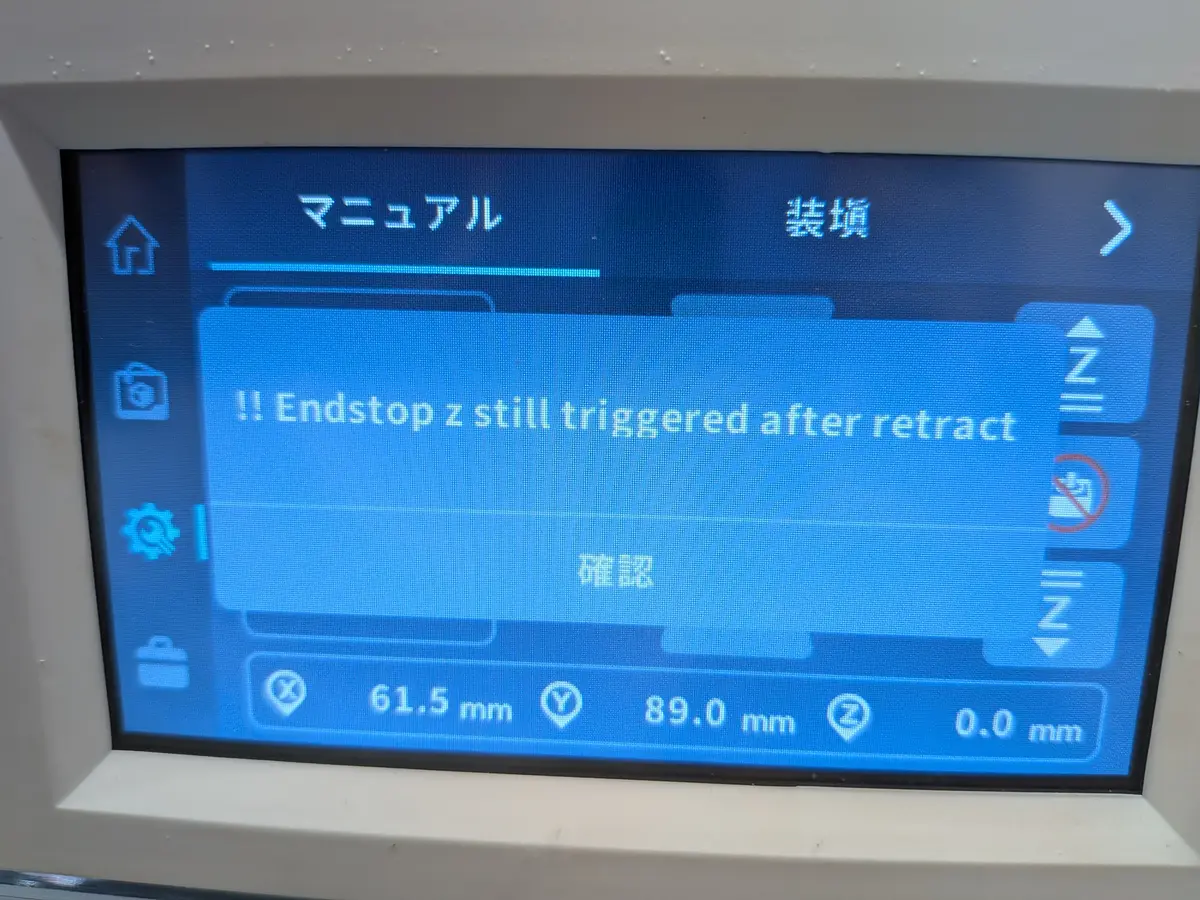
The image above shows the Z-axis endstop error that appeared when I tried homing.
Here’s how the exchange with support went. The numbers in parentheses show how many days had passed since my first inquiry.
- Inquiry: I emailed a description of the symptoms with photos of the error screens and asked how to fix it.
- Request for information (the next day): Support asked me to send a diagnostic video, a photo of the hotend with the front cover removed, the
printer.cfgsettings file, and the nozzle and bed temperature readings while unheated. They even showed how to film the video with a sample clip. - Narrowing down the cause (3–4 days later): From my video, they concluded that the proximity sensor used for leveling had failed. They also pointed out dirt on the carbon rods and asked me to clean them. For the heater error, they couldn’t tell whether the hotend, the adapter board, or the Type-C cable was at fault without a spare hotend, so they recommended buying a new hotend.
- Buying parts: I bought a proximity sensor and a new hotend myself.
- Parts shipment (about 1 week later): Support said they’d send the extruder adapter board and a Type-C cable. They also shared videos showing how to replace each one.
- A missed shipment (about 2 weeks later): The tracking showed the package still hadn’t been picked up, so I asked, and it turned out the support person had forgotten to ship it. They apologized, included a brass nozzle as a goodwill gesture, and promised to ship it that same day.
- Recovery: After replacing the parts, the problem was fixed.
Although the shipment was accidentally overlooked, they checked and dealt with it as soon as I asked.
Responses felt a bit slower than before, but I still consider their support very good.
They narrow down the cause from photos and videos and even show replacement steps on video, which is reassuring if you replace parts yourself.
By the way, during this exchange they also recommended that if I wanted cleaner ABS and nylon prints, I should buy the improved front and back covers.
It’s helpful as a user when they point out things unrelated to the failure itself.
What I hope for from the SMART5
As I’ve described, for me the X-Smart 3 was a 3D printer that was “compact and affordable, yet able to handle high-temperature materials with an upgrade.”
But since the X-Smart 3 was discontinued, no compact successor has come out yet.
That’s exactly why I’m hoping the SMART5 will be that successor.
As of November 2026, the SMART5 has not been officially announced.
The specs below are what can be read from documents submitted to the FCC, and they may change at the official announcement.
| Item | X-Smart 3 (with V2.5 hotend) | SMART5 (FCC filing) | Bambu Lab A1 mini |
|---|---|---|---|
| Price | ¥49,000 for the body (Japan, late 2023) + ¥5,500 for the V2.5 hotend | Not announced | ¥28,000 (lowest price in Japan, November 2026) |
| Build volume | 175 × 180 × 170 mm | 180 × 180 × 180 mm | 180 × 180 × 180 mm |
| Machine size | 370 × 362 × 397 mm | 322 × 344 × 410 mm | 347 × 315 × 365 mm |
| Weight | 10.5 kg | 10 kg | 5.5 kg |
| Max nozzle temperature | 350 °C (not officially listed; used in my setup) | 300 °C | 300 °C |
| Max bed temperature | 120 °C | 80 °C | 80 °C |
| Motion system | CoreXY | CoreXY | Bed slinger |
| Enclosure | Yes | Yes | No |
The machine size and weight of the X-Smart 3 and A1 mini come from each manufacturer’s official information, checked in November 2026. The SMART5’s machine size and weight come from the manual submitted to the FCC.
Prices need a caveat. The X-Smart 3 has been discontinued, and you can no longer buy it new. The price in the table is what I paid at the end of 2023.
The A1 mini, on the other hand, is still on sale, at a lowest price of around ¥28,000 in Japan as of November 2026.
If you’re buying a compact printer now, the A1 mini is effectively what you’d compare against. That’s why I’m watching what price the SMART5 comes out at.
Looking at machine size, the enclosed X-Smart 3 is a size larger than the open-frame A1 mini and roughly twice as heavy.
The SMART5 also has an enclosure, so at 10 kg its weight is close to the X-Smart 3’s. It’s slightly narrower and shallower than the X-Smart 3, but at 410 mm it’s the tallest of the three.
The build volume, max nozzle temperature, and max bed temperature all match the A1 mini, which suggests a product designed with the A1 mini firmly in mind.
On top of that, its CoreXY motion and enclosure are strengths the A1 mini doesn’t have.
It has every chance of being an attractive option as a compact entry-level machine.
Incidentally, what I personally consider a weakness of the A1 mini is that you have to use a microSD card to transfer print files.
Connecting it to a network solves that, but it’s a bit of a hassle if you’d rather keep your printer offline.
The X-Smart 3 lets you transfer files with a USB stick, which is easier in that respect.
As an X-Smart 3 user, though, a few things concern me.
Judging from the published manual, the max bed temperature drops from 120 °C to 80 °C, and ABS and ASA are listed as not recommended.
The manual also says that, out of the box, an 11 × 22 mm area at the front right of the build plate can’t be used, and that you need to remove the filament cutter bracket to use the whole plate.
Here’s what I especially want to check at the official announcement.
- Whether the price can compete with the A1 mini (I was able to buy the X-Smart 3 body for ¥49,000 in Japan at the end of 2023)
- Whether the design lets you swap the hotend to expand the range of materials
- Whether “not recommended” for ABS and ASA is a hardware limitation or just a matter of official support scope
The X-Smart 3 let me expand the materials I could print after purchase by swapping the hotend.
If the SMART5 has the same kind of room to grow and launches at an affordable price, I think it’ll be a really interesting product.
I plan to write another article about the SMART5 once it’s officially announced.
If you don’t need a compact machine, the Q2 is good too
QIDI’s current lineup also includes the Q2.
According to QIDI’s official product page, the Q2 has a 270 × 270 × 256 mm build volume, a 370 °C max nozzle temperature, a 120 °C max bed temperature, and active chamber heating up to 65 °C.
Its price is ¥70,999 in Japan as of November 2026.
For that price you even get chamber heating, which the X-Smart 3 never had, so the Q2 is also amazing value.
It’s bigger than the X-Smart 3, but if you have the space and want to get serious about high-temperature materials, the Q2 is well worth recommending too.
For the latest specs and prices, check the Q2 product page on QIDI’s official website.
Wrapping up
The X-Smart 3 isn’t a magic box that prints anything with ease.
ABS warps, prints stopped midway right after I bought it, and I also experienced a blob of death that damaged the hotend.
Even so, I’ve kept using it for about 3 years because of how capable it is, handling PPS-GF with a hotend upgrade, and because the manufacturer’s support has been there when I needed it.
I’m a QIDI fan, and that’s exactly why I’m looking forward to the SMART5.
At the same time, I find it strange that such a good manufacturer still isn’t well known in Japan.
I can’t wait for the SMART5’s official announcement.
I sincerely hope this improves everyone’s QO3DPL.