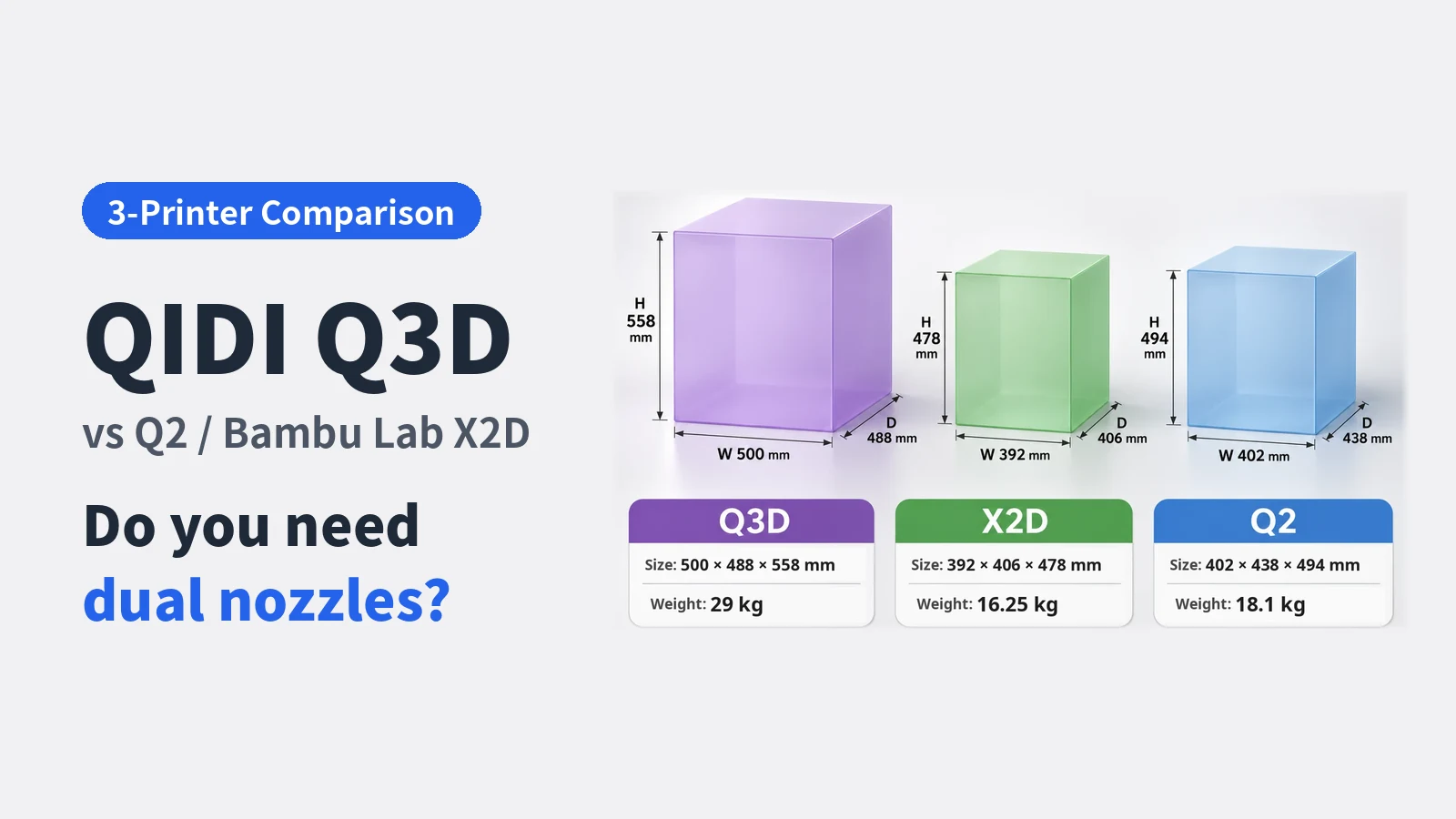
On November 17, 2026, QIDI announced the Q3D, a new 3D printer with dual nozzles.
A 70 °C heated chamber, a new auto-leveling system, and two nozzles you can switch between: the feature list is worth a close look.
But the dual-nozzle market already has Bambu Lab’s X2D.
And QIDI itself sells the single-nozzle Q2 for much less than the Q3D.
In this article, I compare these three printers to help you decide which one to buy right now.
Rather than simply comparing specifications, I evaluate them from these angles:
- Do you really need dual nozzles?
- Maintenance and repair burden
- Size and space requirements
- Product maturity
I’ve been using a QIDI X-Smart 3 for about three years.
I wrote up that experience in QIDI X-Smart 3 Review After 3 Years.
From that perspective, I try to separate catalog specs from the things that actually matter in daily use.
I hope this helps anyone torn about buying a dual-nozzle printer figure out which features they really need.
Note: The specs and prices in this article are based on information published by the manufacturers as of November 18, 2026. The Q3D has only just been announced, and I haven’t used any of the three printers myself. My assessment of the Q3D is based on published specifications, not hands-on testing.
Contents
- Conclusion
- Spec comparison of the three printers
- Do you really need dual nozzles?
- Auto-leveling differences
- Heated chamber differences
- Air filters
- Size and weight
- Release timing and product maturity
- Deciding based on price differences
- Wrapping up
Conclusion
Here’s my take in brief.
- Q3D: For people who want to use dual nozzles and also try high-temperature materials such as PPS-GF20 with the 350 °C nozzle (note that PPS is not listed among the Q3D’s officially supported materials). It’s best suited to buyers who can accommodate its large, heavy frame, accept an estimated three-month wait before shipment, and are comfortable buying a newly announced product. Its regular price is about the same as the X2D’s sale price, but with a pre-order it’s about ¥11,000 cheaper.
- X2D: For people who want to make the most of dual nozzles, value a compact body, and prefer a product with some track record. However, its 300 °C max nozzle temperature falls short of QIDI’s recommended range for PPS-GF20, so it’s not a good fit if you want to use that kind of material.
- Q2: For people who rarely print complex shapes that need a separate support material. It suits people who value a simple design, price, build volume, and high-temperature material support over dual nozzles.
Also, if you don’t need active chamber heating, QIDI’s Q2C is worth considering too.
The Q2C is essentially a Q2 without the active heated chamber, with the air filter and camera available as options.
As of November 11, 2026, it cost ¥55,999, ¥15,000 less than the Q2’s sale price. I compare the Q2C in more detail in my MakeBuddy Smart5 article.
Spec comparison of the three printers
First, here are the manufacturers’ published specs side by side.
| Item | QIDI Q3D | Bambu Lab X2D | QIDI Q2 |
|---|---|---|---|
| Release / announcement | Announced Nov 17, 2026 | Released Apr 14, 2026 | Released Aug 20, 2025 |
| Reference price | ¥107,999 (effectively ¥96,899 with pre-order) | ¥108,000 (Black Friday price, normally ¥126,000) | ¥70,999 (sale price, normally ¥72,999) |
| Number of nozzles | 2 | 2 | 1 |
| Filament feed | Main: direct drive / Auxiliary: Bowden? (inferred from official images) | Left: direct drive / Right: Bowden (extruder on the upper rear) | Direct drive |
| Hotend replacement | Main hotend: quick swap / Auxiliary hotend: replacement method unconfirmed | Quick swap | Tools required |
| Max build volume | 260 × 260 × 260 mm | 256 × 256 × 260 mm | 270 × 270 × 256 mm |
| Build volume with both nozzles | 240 × 260 × 255 mm | 235.5 × 256 × 256 mm | — |
| Max nozzle temperature | 350 °C | 300 °C | 370 °C |
| Max bed temperature | 120 °C | 120 °C | 120 °C |
| Active chamber heating | Up to 70 °C (4th gen) | Up to 65 °C | Up to 65 °C (2nd gen) |
| Auto leveling | Eddy current sensor | Nozzle contact | Load cell |
| Air filter | 3-stage | 3-stage | 3-stage |
| Body size | 500 × 488 × 558 mm | 392 × 406 × 478 mm | 402 × 438 × 494 mm |
| Weight | 29 kg | 16.25 kg | 18.1 kg |
* Prices are Japanese reference prices as of November 18, 2026. They change with release status, pre-order offers, and sales. Check each manufacturer’s official store for the latest specs and prices.
* With a Q3D pre-order, you pay ¥4,750 when you reserve, a ¥15,850 pre-order discount is applied, and the remaining balance is ¥92,149. That’s ¥96,899 in total, ¥11,100 less than the regular price (as shown on QIDI’s official store on November 18, 2026).
The Q3D is not a straight upgrade over the Q2
The first thing I want you to notice in the table is that the Q3D is not simply a better Q2.
- The Q2 has the larger build volume when using a single nozzle
- The Q2’s body is also smaller and lighter
- The Q3D’s advantages are its second nozzle and higher max chamber temperature (70 °C)
On paper, the Q2’s max nozzle temperature is higher: 370 °C versus 350 °C for the Q3D.
However, the QIDI official filaments I checked in my previous article, including PPS-GF20, all have recommended nozzle temperatures of 350 °C or below. At least as long as you use QIDI’s official filaments, this 20 °C gap rarely matters.
That said, required temperatures vary by product once you include third-party materials, so whether you can ignore the 20 °C gap depends on what you print.
The Q3D costs ¥35,000 more at regular prices, and still ¥25,900 more comparing its pre-order price with the Q2’s sale price, yet it doesn’t win in every category.
Whether you value dual nozzles and a 70 °C chamber is what separates the Q3D from the Q2.
Do you really need dual nozzles?
The biggest feature of the Q3D and X2D is that they can use two separate nozzles during a print.
Here, I consider whether dual nozzles fit the way you print.
Advantages of dual nozzles
The biggest advantage is that you can use separate nozzles for model material and support material.
Even with a single nozzle, you can switch materials with a multi-material unit.
But every time you swap materials in one nozzle, you have to purge the material left inside it.
With two nozzles, each one stays loaded with its own material while you switch between them.
If you want to print complex shapes with lots of overhangs, combined with a support material that’s easy to dissolve or peel off, dual nozzles may be more convenient than a single nozzle.
Disadvantages of dual nozzles
On the other hand, dual nozzles inevitably make the mechanism more complex.
- More parts around the print head
- Potentially more work to replace parts or repair the printer when something breaks
Before buying, think about whether you could fix it yourself if it breaks, and how much time and money a repair would take.
Ease of hotend swaps
For day-to-day maintenance, what matters is how easy it is to swap the hotend, the heated assembly that holds the nozzle.
As the spec table shows, the X2D uses quick-swap hotends. QIDI advertises a quick-swap main hotend for the Q3D, but I haven’t confirmed whether the auxiliary hotend is just as easy to replace. The Q2, on the other hand, needs tools.
If you change nozzle sizes often, the ease of swapping hotends can make a bigger difference in day-to-day maintenance than whether the printer has dual nozzles.
Auto-leveling differences
All three printers support auto leveling, but they use different methods.
| Printer | Method and features |
|---|---|
| Q3D | Eddy current sensor. Switched from the Q2’s load cell method |
| X2D | Nozzle contact. Also offers extensive XYZ offset calibration between the two nozzles |
| Q2 | Load cell. With a single nozzle, no nozzle-to-nozzle calibration is needed |
The Q3D uses a new method: an eddy current sensor.
An eddy current sensor measures the distance to the bed without contact, using eddy currents. Unlike the Q2’s load cell or the X2D’s nozzle contact method, it doesn’t measure by pressing the nozzle against the bed.
Because of that, I expect its measurements to be less affected by filament residue on the nozzle tip.
However, we’ll need hands-on testing to see whether it’s faster or more accurate than the Q2’s load-cell system.
Heated chamber differences
Active chamber heating helps prevent warping and cracking in ABS and engineering plastics.
All three printers have it, but they differ in temperature and approach.
| Item | Q3D | X2D | Q2 |
|---|---|---|---|
| Max temperature | 70 °C | 65 °C | 65 °C |
| Heating system name | QIDI 4th gen | — | QIDI 2nd gen |
| Main features | Higher temperature and more uniform heating | Switches between Heat Mode and Cool Mode | 65 °C active heating |
The Q3D’s 70 °C is the highest of the three.
I’d like to compare the X2D’s modes with the Q3D’s outside-air intake and cooling once hands-on information is available.
QIDI’s chamber heating generations
QIDI categorizes its chamber-heating systems by generation. For comparison, I also looked at the Plus4, Plus5, Max4, and earlier models.
The improvements in the table are based on QIDI’s rated figures, official blog, and reviews, not on my own measurements.
| Generation | Representative models | Heater power | Rated max temperature | Main improvement |
|---|---|---|---|---|
| 1st gen | X-Plus 3, X-Max 3, Q1 Pro | 300 W (X-Max 3) | 60–65 °C | The first generation with a heated chamber. |
| 2nd gen | Plus4, Q2 | 400 W (Plus4), 280 W (Q2) | 65 °C | A circulation fan moves air around the chamber to reduce temperature variation. |
| 3rd gen | Plus5, Max4 | 550 W (Plus5), 500 W (Max4) | 65 °C | Higher heater power and 38% better heating efficiency than the Plus4. Same max temperature, but faster warm-up. |
| 4th gen | Q3D | 280 W | 70 °C | Max temperature raised to 70 °C. QIDI says it keeps the chamber temperature uniform to reduce warping and layer cracking. |
* Heater power and improvements for the 2nd to 4th generations are based on QIDI’s product spec sheets and official blog (checked November 18, 2026).
Measured warm-up times and chamber temperature distribution data are needed to assess how quickly and evenly the 4th-generation system actually heats up.
Air filters
All three printers list the same 3-stage air filter:
- G3 pre-filter
- H12 HEPA filter
- Coconut shell activated carbon filter
Size and weight
I lined up the three printers’ outer dimensions and weights at the same scale.
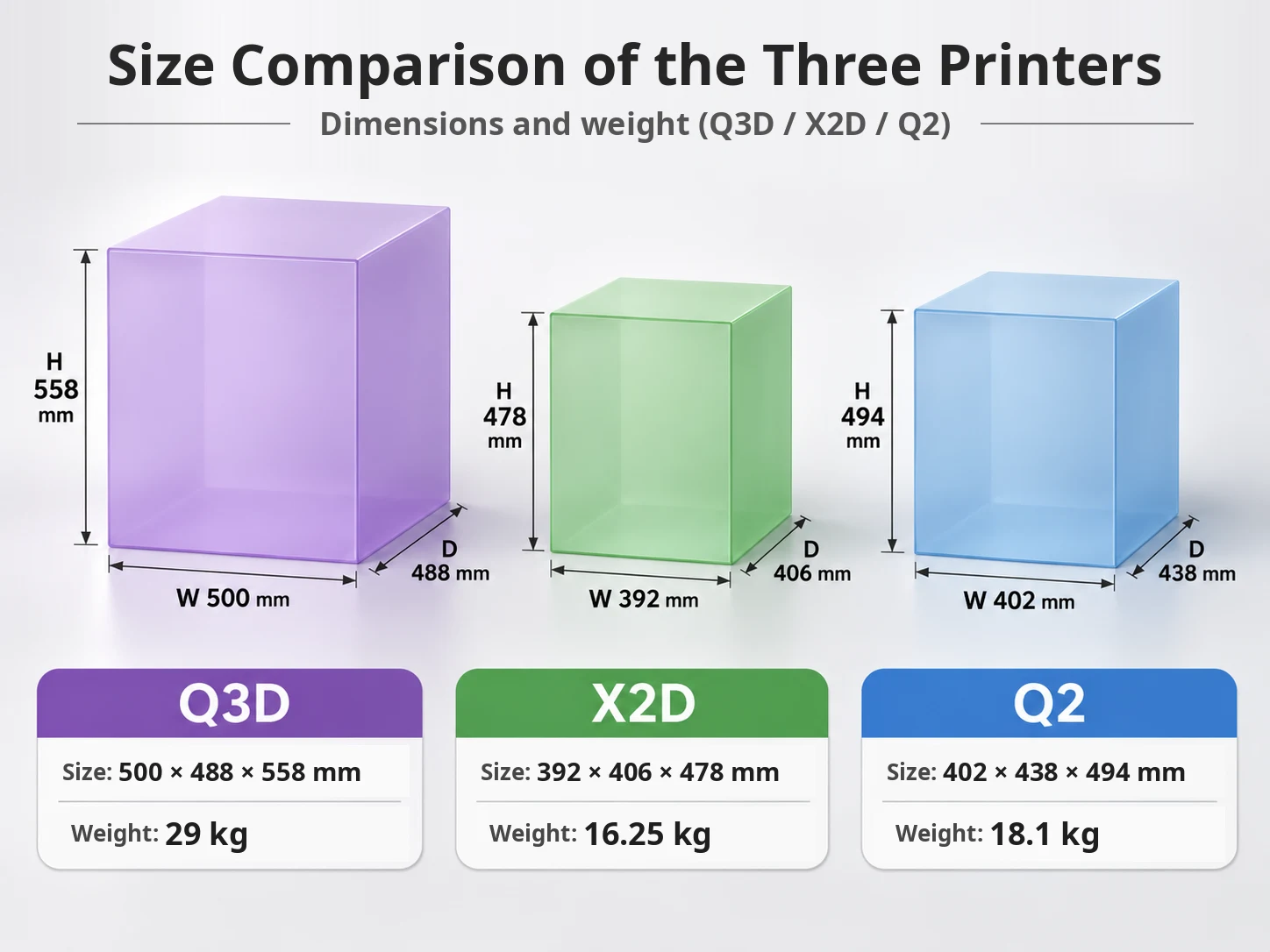
As the chart shows, only the Q3D is noticeably bigger.
By outer volume, the Q3D is about 1.8 times the X2D and about 1.6 times the Q2.
It also weighs 29 kg, far more than the X2D’s 16.25 kg and the Q2’s 18.1 kg.
Even though all three have build volumes of around 260 mm, their bodies differ this much in size.
For homes with limited space, the Q3D’s size and weight are a clear disadvantage.
You’ll also want a sturdy stand that can hold a 29 kg machine.
The Q3D is the same size as the Plus5
What caught my attention is that the Q3D’s body dimensions and rated weight are exactly the same as QIDI’s large 320 mm-class Plus5.
| Printer | Max build volume | Body size | Weight |
|---|---|---|---|
| Q3D | 260 mm class | 500 × 488 × 558 mm | 29 kg |
| Plus5 | 320 mm class | 500 × 488 × 558 mm | 29 kg |
The Q3D is a 260 mm-class printer, yet its body is the same size as a 320 mm-class machine.
Some possible reasons:
- It shares its enclosure design with the Plus5
- It needs room for two nozzles to move
- It needs space for the heating and cooling mechanisms
However, I haven’t been able to confirm whether it reuses the Plus5’s enclosure or parts. These are just my guesses.
Release timing and product maturity
Beyond catalog specs, how mature a product is also matters.
| Printer | Status as of November 2026 |
|---|---|
| Q2 | About 1 year and 3 months since release. A relatively large number of long-term user reviews and reports of known issues are available |
| X2D | About 7 months since release. Early users’ feedback is available |
| Q3D | Announced on November 17, 2026. Currently on pre-order, shipping about 3 months after order and payment. Long-term reliability is unknown |
The Q3D’s new features are appealing.
But the Q3D is still at the pre-order stage, and QIDI’s official store says it ships about 3 months after the order and payment are complete.
The wait, along with the risk of buying a product right after launch, can’t be ignored.
Early-batch issues and firmware maturity only become clear once people actually start using it.
Throughout this article, I’ve tried to distinguish manufacturer marketing, independent hands-on reviews, and my own guesses.
For the Q3D, not overrating the published specs and waiting for hands-on reviews to come in is a perfectly reasonable choice.
Deciding based on price differences
Here are the price differences based on the reference prices.
| Comparison | Pre-order / sale prices | Regular prices |
|---|---|---|
| Q2 → Q3D | ¥25,900 | ¥35,000 |
| Q3D → X2D | ¥11,101 | ¥18,001 |
| Q2 → X2D | ¥37,001 | ¥53,001 |
I used ¥96,899 for the Q3D (pre-order price), ¥108,000 for the X2D (sale price), and ¥70,999 for the Q2 (sale price).
Comparing the Q3D’s regular price of ¥107,999 with the X2D’s sale price, the difference is just ¥1.
For the extra ¥25,900 (at pre-order and sale prices), the Q3D mainly adds dual nozzles and a 70 °C chamber.
On the other hand, the Q2 has the larger single-nozzle build volume, and the Q3D’s body is bigger and heavier.
If you don’t plan to use dual nozzles, there’s little reason to pay the difference.
With a pre-order, the Q3D is about ¥11,000 cheaper than the X2D on sale.
The Q3D wins on price, max nozzle temperature (350 °C), and chamber temperature (70 °C).
The X2D wins on compactness, nozzle-to-nozzle auto calibration, and about 7 months of track record.
However, the X2D’s max nozzle temperature is 300 °C. For example, QIDI recommends 300–350 °C for PPS-GF20 on its product page and 310–350 °C in its printing tips, so the X2D falls short of that range and is less suitable for that filament. For anyone who wants to use such high-temperature materials, that’s a clear disadvantage of the X2D.
I’d split it this way: choose the Q3D if you prioritize high-temperature materials and price, and the X2D if you prioritize a smaller footprint and peace of mind.
That said, if you miss the pre-order and buy the Q3D at its regular price, the difference from the X2D’s sale price is just ¥1.
Also, QIDI estimates shipment about three months after the order and payment are completed, so delivery will take additional time. If you want to start printing right away, factor in that wait too.
Ongoing filament costs
Besides the printer price, let’s compare the cost of filament, which you’ll keep paying as you use it.
Comparing each company’s standard official PETG filament, the prices are as follows.
| Manufacturer | Official PETG filament price |
|---|---|
| QIDI | ¥2,899 |
| Bambu Lab (with spool) | ¥2,800 |
| Bambu Lab (without spool) | ¥2,200 |
* Prices on each company’s official Japan store as of November 18, 2026.
Comparing spooled filament, the difference is about ¥100, which is barely anything.
Bambu Lab also sells filament without a spool, which is about ¥700 cheaper than QIDI’s.
For general-purpose materials like PETG, Bambu Lab has a slight edge.
Also, both companies’ printers can generally use third-party filament, so the price gap between official filaments doesn’t translate directly into a difference in running costs.
For people who print large objects, filament costs add up more than you might think.
Don’t decide on printer price alone. Take a moment to compare prices for the materials you actually want to print.
Wrapping up
The Q2, X2D, and Q3D each stand out with different strengths.
- Q2: Simple design, price, build volume, and high-temperature material support
- X2D: Compactness and a proven ecosystem
- Q3D: A 70 °C high-temperature chamber, a 350 °C nozzle that reaches the recommended temperature range for PPS-GF20, and a new dual-nozzle mechanism
What matters isn’t which one is best, but which features you actually need for what you print.
If you regularly separate model and support materials, go with the Q3D or X2D. Otherwise, the Q2 is probably enough for many people.
Once hands-on information on the Q3D is in, I hope it surprises us the way the Q2 did: “I can’t believe how much this can do for the price.”
I sincerely hope this improves everyone’s QOQIL.
References
- QIDI Q2 product page (QIDI official Japan store)
- QIDI Q2C product page (QIDI official Japan store)
- QIDI Q3D product page (QIDI official store)
- QIDI Launches Q3D Dual-Nozzle Filament 3D Printer With a 70°C Heated Chamber at Formnext 2026 (3DPrinting.com)
- QIDI 3D Printer Comparison 2026: Q2C, Q2, Plus 5, Max4 (QIDI official blog)
- QIDI Plus 5 vs Plus 4: Specs, Upgrades and Who Should Buy (QIDI official blog)
- Two extruders, one purpose: what is X2D Direct Drive Extrusion and Auxiliary Extrusion? (Bambu Lab Blog)
- QIDI X-Smart 3 Review After 3 Years
- What’s Going On, QIDI? Is the MakeBuddy Smart5 Worth It?
Comments
Leave a comment