I’m a QIDI TECH fan, and I have good reasons to be. I’ve used my X-Smart 3 since late 2023, and it’s still my main 3D printer. QIDI’s support has also impressed me.
I wrote up that experience in QIDI X-Smart 3 Review After 3 Years.
At the end of that article, I said I was looking forward to a new compact printer that had shown up in an FCC filing.
Then, on November 10, 2026, QIDI released it as the “MakeBuddy Smart5” (which I’ll call the Smart5 below).
Fully automatic leveling, tool-free hotend swaps, an air filter: the feature list looks attractive.
But the price is ¥54,999 (incl. tax)*.
To be honest, when I saw the specs and the price, I felt underwhelmed.
In this article, I’ll first go over the Smart5’s specs.
Next, I’ll compare the Smart5 with the X-Smart 3, QIDI’s current Q2 and Q2C, and Bambu Lab’s A1 mini in terms of value for money.
Finally, I’ll share my perspective as a longtime X-Smart 3 user and QIDI fan.
I hope it helps anyone considering a compact 3D printer decide whether the Smart5 is right for them.
* All prices in this article are Japanese prices as of November 11, 2026.
Contents
- Conclusion
- MakeBuddy Smart5 key specs
- Comparing five printers
- Value for money
- Commentary: What’s going on, QIDI?
- Wrapping up
Conclusion
Here’s my take in brief.
- The Smart5 is a compact home 3D printer with fully automatic leveling, tool-free hotend swaps, and an air filter.
- On the other hand, with a 300 °C max nozzle temperature and an 80 °C max bed temperature, its support for high-temperature materials is narrower than the X-Smart 3’s.
- At ¥54,999, it’s only ¥1,000 cheaper than QIDI’s own Q2C (¥55,999), and it costs enough to buy two A1 minis (¥26,000 each in a sale scheduled to start November 13).
- If price is your priority, the A1 mini makes more sense. If you prioritize material compatibility and build volume, the Q2C or Q2 is a stronger choice. That leaves the Smart5 in an awkward position.
MakeBuddy Smart5 key specs
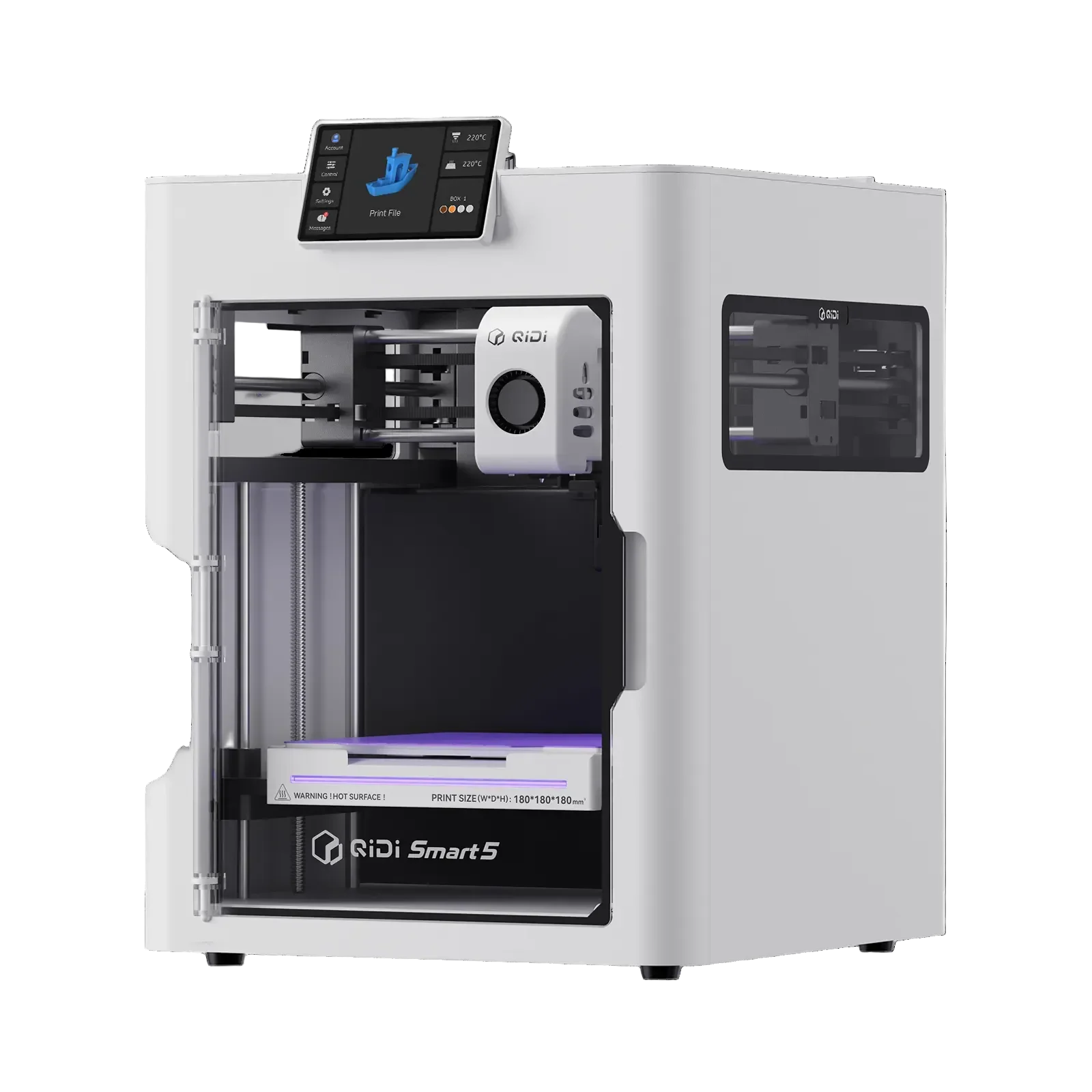
Image source: QIDI JP Store, “MakeBuddy Smart5”
It has a white box-shaped body, a clear front door, and a touchscreen on top that you tilt up to use.
First, let’s look at the Smart5’s key specifications.
MakeBuddy is QIDI’s new home-oriented product line, and the Smart5 is its first model.
QIDI is aiming it at children, families, and STEAM education, and the official store says it’s designed for children from around age 8, with adult supervision.
According to a hands-on review, the printer needs no assembly.
For how it works in practice, see YuTR0N’s QIDI MakeBuddy Smart5 hands-on review (Psych0h3ad).
The following is based on the product page on QIDI’s official Japan store and the launch press release, checked on November 11, 2026. The filament listing was rechecked on November 18.
| Item | Spec |
|---|---|
| Price | ¥54,999 (incl. tax) |
| Release | November 10, 2026, 23:00 JST (QIDI official store) |
| Technology | FDM (fused deposition modeling) |
| Motion system | CoreXY |
| Build volume | 180 × 180 × 180 mm |
| Printer dimensions | 322 × 344 × 410 mm |
| Weight | 10 kg |
| Max travel speed | 600 mm/s |
| Max acceleration | 20,000 mm/s² |
| Max nozzle temperature | 300 °C |
| Max bed temperature | 80 °C |
| Enclosure | Yes |
| Active chamber heating | No (not listed in the spec table) |
| Auto leveling | Load cell sensor built into the hotend |
| Hotend | Tool-free quick-swap |
| Air filter | G3 pre-filter + H12 HEPA + activated carbon |
| Camera | Built-in (up to 1080p, timelapse support) |
| Display | 4-inch touchscreen |
| Storage | 32 GB eMMC, USB drive |
| Connectivity | Wi-Fi (2.4 GHz / 5 GHz), USB |
| Filaments listed by the official store | PLA, PETG, etc. (ABS and ASA not specified) |
| Multicolor printing | Supported with the optional QIDI BOX |
| Included filament | PLA 250 g × 4 spools (1 kg total) |
* Price from QIDI’s official Japan store as of November 11, 2026.
Update (November 18, 2026): The current QIDI Japan product page lists compatible filaments as “PLA, PETG, etc.” and no longer shows a “not recommended” notice for ABS or ASA. A user’s November 16 note also reports that the wording had disappeared by that date.
However, the FCC-submitted manual and the spec table in the hands-on review mentioned above both list ABS and ASA as not recommended. Removing that notice from the product page does not establish that QIDI now officially recommends those materials.
That said, the same hands-on review also tried printing QIDI’s glass-fiber-reinforced ABS, “ABS-GF25.” Judging from the photos in the review, there’s no major warping.
QIDI Studio shows the unprintable area
Out of the box, an 11 × 22 mm area at the front right of the build plate can’t be used.
According to the official page, you need to remove the filament cutter to use the whole plate.
You can also see this limit in QIDI’s own slicer, QIDI Studio.
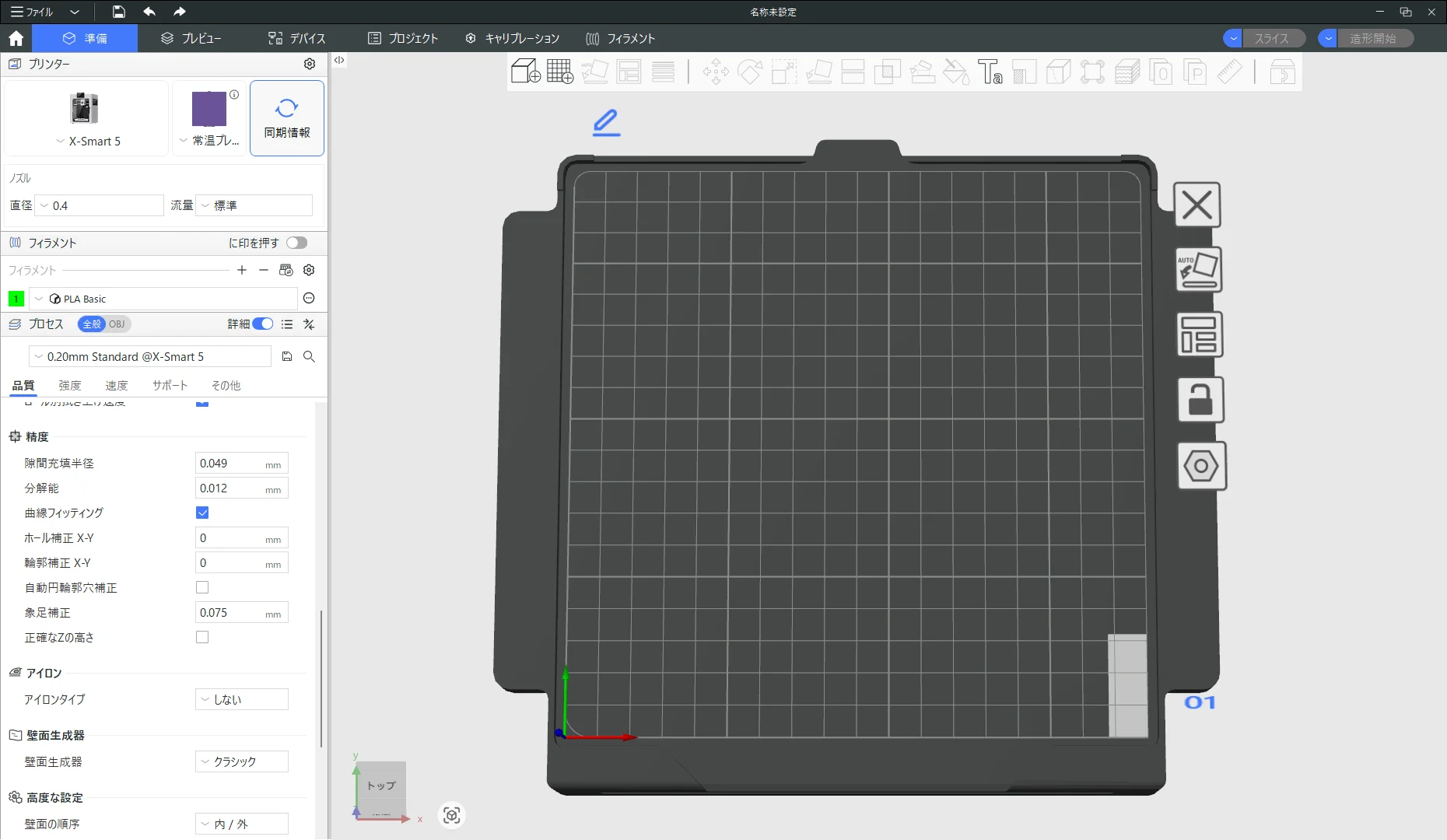
The screenshot above shows QIDI Studio with the Smart5 profile selected. The white rectangle at the front right of the build plate marks the area you can’t print on.
The unprintable area is clearly marked in the slicer, making it easier to avoid placing models there. That’s a thoughtful touch.
By the way, in the official profiles published on QIDI Studio’s GitHub (checked November 11, 2026), this area is set to 12 × 32 mm, a little larger than the 11 × 22 mm on the official page.
Also, the printer name at the top left of the screen is “X-Smart 5.”
Unless that’s a configuration mistake, it seems to be treated as the fifth generation of the X-Smart series.
Load-cell auto leveling
The first thing I want to praise about the Smart5 is auto leveling with a load cell sensor built into the hotend.
The X-Smart 3 levels with a proximity sensor, and on my unit that sensor actually failed once.
Using the nozzle itself for leveling keeps the area around the print head simpler and lighter, which is why it has become the mainstream approach recently.
Tool-free hotend swaps
The next thing I want to praise is that you can swap the hotend without tools.
On the X-Smart 3, you have to open the front cover, remove screws, and reconnect a connector. The job only takes about 10 minutes, but one-touch swapping is a clear step forward.
Enclosure and air filter
Even though it’s a compact machine, the Smart5 comes standard with an enclosure and a three-stage air filter.
For a 3D printer used at home, I appreciate that it comes with filtration to help reduce airborne particles and odors during printing.
Neither the X-Smart 3 nor the A1 mini has an air filter.
That said, a filter can’t remove everything. You still need to ventilate the room.
Also note that keeping the chamber warm with an enclosure is different from actively heating it with a heater.
The Smart5’s spec table has no chamber heater item, so it’s safe to assume there’s no active heating.
Dedicated bimetal hotend and engineering plastics
There’s a dedicated “Smart5 Bimetal Hotend” for the Smart5.
On QIDI’s official Japan store, it was available in four nozzle diameters—0.2, 0.4, 0.6, and 0.8 mm—for ¥1,599 each*.
It’s called a hotend, but what you actually swap is the nozzle part, so the price is reasonable. It’s in about the same price range as Bambu Lab’s replacement nozzles.
* Price as of November 11, 2026.
I couldn’t confirm on the official page whether the stock nozzle is bimetal.
However, the only replacement nozzles in the accessory store are bimetal ones, so the stock nozzle is probably bimetal too.
With a bimetal nozzle, you can print some materials that contain CF or GF.
However, the current Smart5 product page does not explicitly confirm compatibility with CF- or GF-filled materials.
The official store lists “PLA, PETG, etc.” without specifying which other materials are supported. Some engineering plastics may still be printable within the Smart5’s 300 °C nozzle and 80 °C bed limits.
Here’s how the recommended conditions on the product pages of QIDI’s own filaments compare with the Smart5’s limits.
| Material | Recommended nozzle temp | Recommended bed temp | Enclosure / chamber requirement | Versus the Smart5’s limits |
|---|---|---|---|---|
| PA12-CF | 280–300 °C | 40–70 °C | Enclosed printer required | Within range |
| UltraPA (PPA) | 260–280 °C | 70–80 °C | Enclosed printer required, active heating recommended | Within range (no active heating) |
| PET-CF | 270–300 °C | 70–80 °C | Enclosed printer recommended, heated chamber not needed | Within range |
| PET-GF | 260–320 °C | 80 °C | Enclosed printer recommended | Usable in the range up to 300 °C |
| PAHT-CF | 300–320 °C | 70–90 °C | Enclosed printer required | Nozzle temp right at the lower limit |
| UltraPA-CF25 | 300–340 °C | 70–80 °C | Not stated | Nozzle temp right at the lower limit |
| PPS-GF20 | 300–350 °C | 80–100 °C | Not stated | Out of reach (the printing tips on the same page say 310–350 °C) |
The recommended conditions come from the product page of each filament on QIDI’s official Japan store, checked on November 11, 2026.
This comparison is based solely on temperature specifications. It does not show that the Smart5 can actually print these materials.
On paper, PA12-CF, UltraPA, PET-CF, and PET-GF are within reach.
It’s a good idea to ask QIDI’s official support before trying them.
Comparing five printers
From here, I’ll compare the Smart5 with the following four printers.
- X-Smart 3: The compact QIDI printer I’ve used for about 3 years. Already discontinued.
- Q2C: A current QIDI model. Larger build volume, and it handles high-temperature materials too.
- Q2: The higher-end model that adds active chamber heating and an air filter, among other things, to the Q2C.
- A1 mini: Bambu Lab’s compact printer. Same build volume as the Smart5, and a go-to entry-level machine.
| Item | X-Smart 3 (with V2.5 hotend) | Smart5 | Q2C | Q2 | A1 mini |
|---|---|---|---|---|---|
| Price (incl. tax) | ¥49,000 body + ¥5,500 V2.5 hotend (when purchased) | ¥54,999 | ¥55,999 | ¥70,999 (sale, regularly ¥72,999) | ¥26,000 (sale price starting November 13, regularly ¥29,800) |
| Build volume | 175 × 180 × 170 mm | 180 × 180 × 180 mm | 270 × 270 × 256 mm | 270 × 270 × 256 mm | 180 × 180 × 180 mm |
| Printer dimensions | 370 × 362 × 397 mm | 322 × 344 × 410 mm | 402 × 438 × 494 mm | 402 × 438 × 494 mm | 347 × 315 × 365 mm |
| Weight | 10.5 kg | 10 kg | 16.9 kg | 18.1 kg | 5.5 kg |
| Motion system | CoreXY | CoreXY | CoreXY | CoreXY | Bed slinger |
| Max nozzle temperature | 350 °C (not officially listed, used in practice) | 300 °C | 370 °C | 370 °C | 300 °C |
| Max bed temperature | 120 °C | 80 °C | 120 °C | 120 °C | 80 °C |
| Enclosure | Yes | Yes | Yes | Yes | No |
| Active chamber heating | No | No | No | Up to 65 °C | No |
| Auto leveling | Proximity sensor | Load cell | Load cell | Load cell | Yes |
| Air filter | No | Standard | Optional | Standard | No |
| Multicolor printing | Not supported | QIDI BOX (sold separately) | QIDI BOX (sold separately) | QIDI BOX (sold separately) | AMS lite (sold separately) |
* Prices are from each manufacturer’s official Japan store as of November 11, 2026. Only the X-Smart 3 price is what I paid at the end of 2023.
The Q2 and A1 mini sale prices are from each company’s Black Friday sale.
QIDI’s sale in Japan runs until 0:59 JST on December 7, 2026, and Bambu Lab’s main sale runs from 11:00 JST on November 13 to 23:59 JST on December 10, 2026.
The Q2C’s ¥55,999 was shown as the regular price on the official store, not as a sale price.
For the latest specs and prices, check each manufacturer’s official store.
- QIDI MakeBuddy Smart5
- QIDI Q2C
- QIDI Q2
- Bambu Lab A1 mini specs
- Bambu Lab Black Friday sale (Bambu Lab official Japan store)
Value for money
From here, I’ll compare the Smart5 with each alternative to see whether its features justify the price difference.
Compared with the X-Smart 3
I bought the X-Smart 3 for ¥49,000 at the end of 2023.
It has CoreXY, an enclosure, and a 120 °C max bed temperature, and after swapping in the V2.5 hotend, I’ve been able to print even PPS-GF in my setup.
The Smart5 costs about ¥6,000 more than that.
Compared with the X-Smart 3, the Smart5 offers more automated bed leveling, easier hotend swaps, and built-in air filtration and a camera.
On the other hand, the max bed temperature drops from 120 °C to 80 °C, and you can’t use a high-temperature hotend like the V2.5.
It’s easier to use, but the range of materials it can handle is narrower.
As someone who has used high-temperature materials on the X-Smart 3, I see it less as a direct successor and more as a printer aimed at a different audience.
Compared with the Q2C
The Smart5’s toughest competitor may actually be QIDI’s own Q2C.
The Q2C costs ¥55,999, just ¥1,000 more than the Smart5.
For just ¥1,000 more, the Q2C offers:
- The build volume grows to 270 × 270 × 256 mm, about 3.2 times the printable volume.
- The max nozzle temperature goes up to 370 °C and the max bed temperature to 120 °C.
- High-temperature materials like PPS-GF can be printed within their recommended conditions.
On the other hand, the Q2C has no active chamber heating, and the air filter and camera are optional.
The machine is also 402 × 438 × 494 mm and 16.9 kg, much bigger and heavier than the Smart5.
If space isn’t an issue, I think the Q2C is by far the better deal for printing functional parts.
Compared with the Q2
The Q2 is ¥70,999 on sale, ¥16,000 more than the Smart5.
On top of the Q2C’s capabilities, it comes standard with active chamber heating up to 65 °C and an air filter.
As I wrote in my X-Smart 3 review, getting chamber heating at this price is really impressive.
If you want to get serious about materials like ABS and PPS-GF, I think the Q2 is the top choice.
However, the machine is the same size as the Q2C and weighs 18.1 kg.
Compared with the Smart5’s 322 × 344 × 410 mm and 10 kg, it needs a lot more space.
Compared with the A1 mini
And the biggest rival among compact printers is Bambu Lab’s A1 mini.
The A1 mini is regularly ¥29,800, and it’s scheduled to drop to ¥26,000 in the Black Friday sale that starts at 11:00 JST on November 13, 2026.
Its build volume is 180 × 180 × 180 mm, with a 300 °C max nozzle temperature and an 80 °C max bed temperature, exactly the same as the Smart5.
The difference from the Smart5 is ¥28,999 at the sale price.
For the price of one Smart5, you could buy two A1 minis and still have change left over.
Of course, the two are built differently.
The A1 mini is an open-frame machine whose bed moves back and forth, with no enclosure and no air filter.
The Smart5 is CoreXY, and its bed only moves up and down inside the machine, so nothing sticks out the front or back.
Even so, with the same build volume and the same temperature limits, I think it’s hard for first-time buyers to justify the price difference.
Value for money summary
Even taking into account the Smart5’s strengths, such as the enclosure, air filter, ease of maintenance, and compact body, my conclusion is that ¥54,999 is a tough price for the Smart5.
- If price matters most, the A1 mini
- If material range and build volume matter most, the Q2C
- If you want to use high-temperature materials reliably, the Q2
Squeezed between these three, the Smart5’s strongest selling points are its compact footprint and its family-friendly features.
If the Smart5 had been ¥39,800, or at least under ¥45,000, I think my verdict would have been very different.
Commentary: What’s going on, QIDI?
So far, I’ve compared the printers based on published specs and prices.
From here on, these are my personal thoughts as someone who has used the X-Smart 3 for about 3 years.
Is photo-to-3D AI useful for making things?
One of the Smart5’s features is its integration with the “QIDI JOY” smartphone app.
It promotes a feature that uses AI to create 3D models from photos and illustrations.
However, the launch press release says the AI feature for generating 3D models from photos and illustrations is “planned for a future update.”
Even if it does arrive, I don’t think this feature suits making things where dimensions matter.
I don’t know which AI model it uses.
But when I tried AI tools that create 3D models from images in the past, I got errors of several millimeters or more.
For mechanical parts or jigs, being off by several millimeters makes them useless.
To begin with, creating an accurate 3D shape from a single photo is theoretically impossible.
A photo doesn’t contain any information about the back of the object.
The AI fills in the parts it can’t see by guessing, based on the shapes it has learned.
The model may look natural, but there’s no guarantee it matches the real object’s shape.
Note that this isn’t based on me actually testing and measuring the Smart5’s AI feature. It’s my reasoning from past experience and basic principles.
On the other hand, for turning a child’s drawing into a 3D object or making a character-style figure of yourself, I think it’s a really fun feature.
Those are uses where the experience of seeing your own idea take shape matters more than accuracy.
What I want from a 3D printer is simply different from what QIDI wants to deliver with the Smart5.
The Smart5 is not the X-Smart 3’s successor
Taken together, these features reveal the design philosophy behind the Smart5.
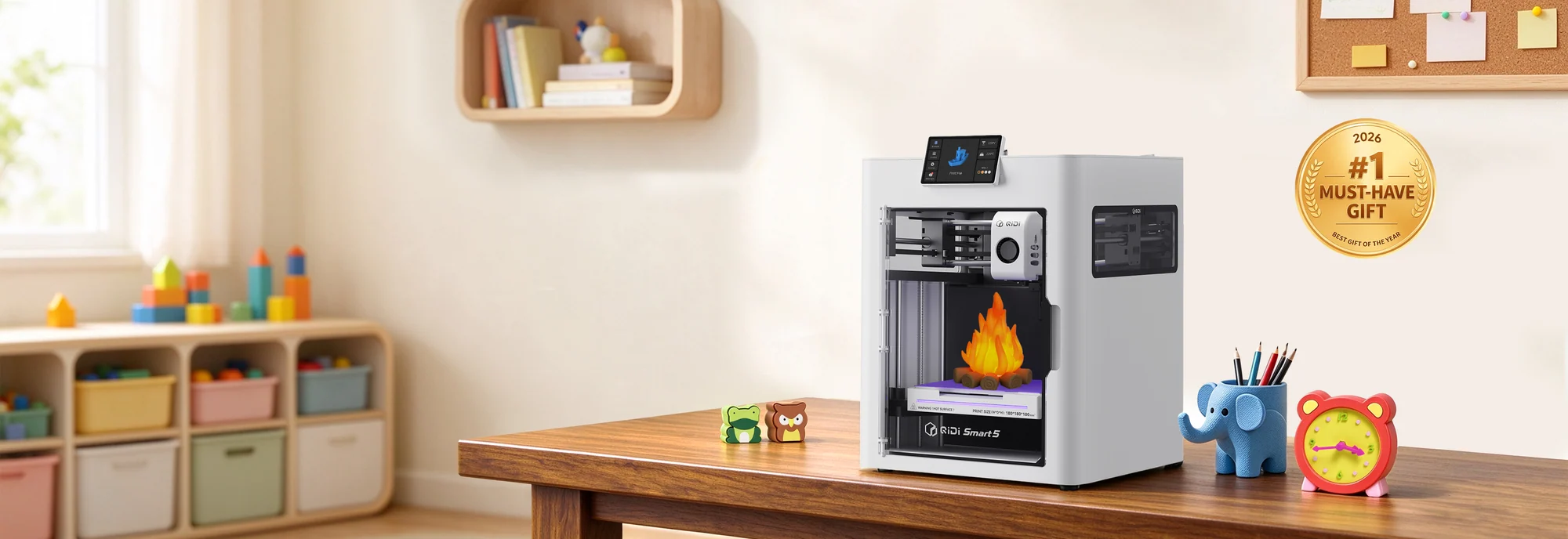
Image source: QIDI JP Store, “MakeBuddy Smart5”
QIDI’s official images also make it clear that the Smart5 is meant to sit in a child’s room and make toys and small items.
It’s registered as “X-Smart 5” in QIDI Studio, but the Smart5 doesn’t carry on the X-Smart 3’s “compact, yet handles high-temperature materials” approach.
Auto leveling, tool-free hotend swaps, an air filter, the app and its AI features:
all of them are designed to make the printer more approachable for children and families.
I understand that trade-off.
I also think it makes sense for QIDI to take on the home and education market.
The problem is still the price.
With the A1 mini available for ¥26,000 on sale, QIDI has to explain to beginners why they should pay more than twice as much.
On top of that, QIDI itself sells the Q2C for just ¥1,000 more.
The Smart5 isn’t a bad printer. It’s simply up against exceptionally strong competition—even from QIDI’s own lineup.
Wrapping up
The Smart5 is by no means a bad 3D printer.
Fully automatic leveling, tool-free hotend swaps, an enclosure, an air filter: there’s a lot to like.
With a bimetal nozzle, it can also handle some materials that contain CF or GF.
As a first 3D printer for children and families, I think it’s well thought out.
But what I was hoping for from QIDI was a little different.
An X-Smart 3 with automatic leveling and easy hotend swaps, available for under ¥45,000.
A compact printer like that could have given the A1 mini a serious run for its money.
The actual Smart5 is a ¥54,999 printer that narrows its high-temperature material support and focuses on features for the home.
For now, I plan to pass on it.
I’ll keep using the X-Smart 3, and when it’s time to replace it, I think I’ll go with the Q2.
Even so, I’m a QIDI TECH fan.
I believe QIDI can once again build a compact printer that makes people say, “I can’t believe how much this thing can do for the money.”
What’s going on, QIDI? I’m still looking forward to your next compact printer.
References
- QIDI MakeBuddy Smart5 product page (QIDI official Japan store)
- Smart5 Bimetal Hotend (QIDI official Japan store)
- QIDI Studio official profiles (X 5 Series, GitHub)
- MakeBuddy Smart5 launch press release (PR TIMES, Japanese)
- QIDI MakeBuddy Smart5 hands-on review (Psych0h3ad, Japanese)
- QIDI JOY (App Store)
- QIDI JOY (Google Play)
- QIDI Q2C product page (QIDI official Japan store)
- QIDI Q2 product page (QIDI official Japan store)
- QIDI Black Friday sale (QIDI official Japan store)
- Bambu Lab A1 mini specs
- Bambu Lab Black Friday sale (Bambu Lab official Japan store)
- Bambu Lab Black Friday sale press release (PR TIMES, Japanese)
Comments
Leave a comment