GitHub: mitz17/ANSYS_Version_Selector
This tool is publicly available on GitHub, so you can review the code and README directly if you are interested.
The tool introduced in this article is an unofficial personal utility and is not affiliated with or supported by Ansys.
Why I Built It
In my own environment, when multiple versions of Ansys Fluent, Ansys SpaceClaim, and Ansys Workbench were installed, it was sometimes harder than it should have been to control exactly which version would open a file.
I ran into cases where I clicked 2025 R2, but 2025 R1 opened instead.
And if the default app was set to a newer version, it became too easy to open an older simulation file in that newer version by mistake.
If you then save the file without thinking, it may become difficult or impossible to reopen it in the older version afterward.
In real workflow terms, that is annoying enough that I wanted an explicit version selection step every time.
So I built a small version selector tool for Fluent, SpaceClaim, and Workbench.
What the Tool Does
This is a small GUI launcher for Windows that lets you choose the version before launching Ansys products.
It currently supports:
- Fluent
- SpaceClaim
- Workbench
The idea is simple: register installed executables by version, then explicitly choose which version should open the target file.
That helps reduce risks such as:
- Opening an older simulation file in the wrong version
- Launching an unintended version in a multi-version setup
- Manually searching for the executable path every time
Supported Products
Fluent
Supported extensions:
.msh.msh.h5.cas.cas.h5.dat.dat.h5
For Fluent, the tool does more than simply launch the EXE. It generates a temporary .jou file based on the input file type and uses that for automatic loading.
It also supports:
- Solver / Meshing mode
- 2D / 3D
- Double Precision
- Process count selection
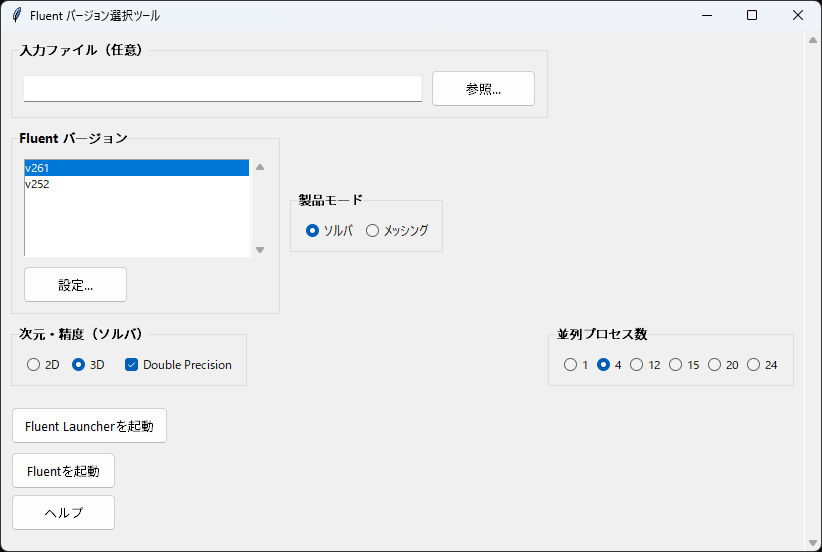
The Fluent screen lets you choose not only the version, but also the product mode, dimensionality, precision, and process count.
So instead of choosing only “which version to open,” you can define the launch conditions in one step.
SpaceClaim
Supported extensions:
.scdoc.step.stp.iges.igs
This one is simpler. It launches the selected version of SpaceClaim.exe and passes the target file directly.
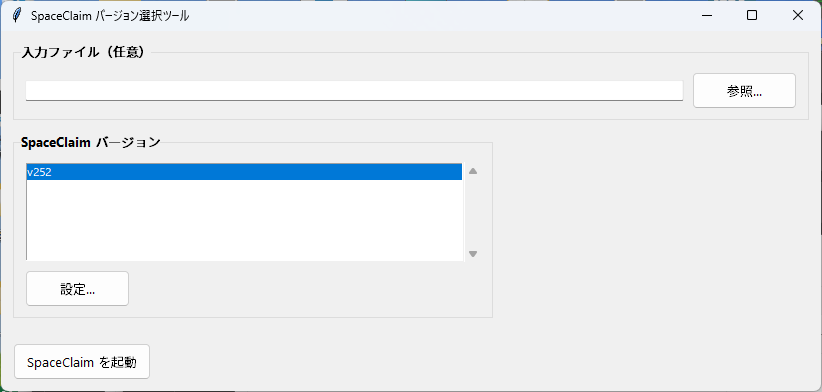
Because SpaceClaim uses relatively simple launch arguments, the UI is also very minimal.
Its role is focused on selecting the file and choosing which version should open it.
Workbench
Supported extensions:
.wbpj
Workbench is launched by passing -F <filepath> to the selected executable.
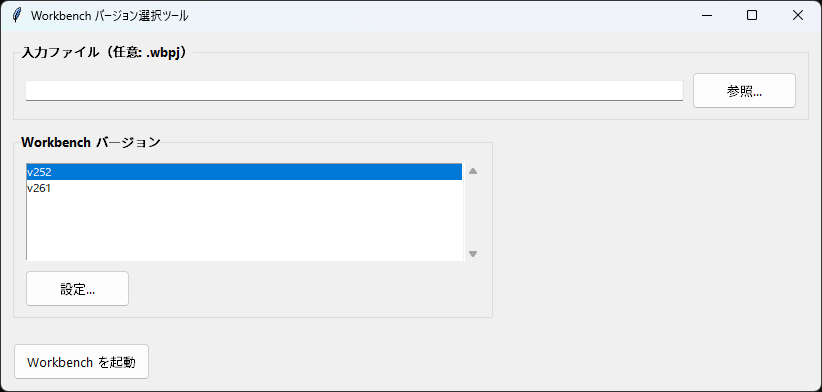
Workbench is also intentionally simple: choose the .wbpj, choose the version, and launch it.
Just making the target version explicit already helps reduce accidental opens in the wrong version.
Implementation Approach
The GUI is built with tkinter.
The reason is simple: I wanted to avoid unnecessary dependencies for something meant to be used and distributed on Windows.
Each launcher is a separate script, but configuration storage and version management UI are shared.
That shared logic lives in launcher_common.py.
Settings are stored as JSON.
The stored mapping is simply “version label” to “absolute executable path for that version.”
For example, a Fluent config looks like this:
{
  "versions": {
    "v252": "C:\\Program Files\\ANSYS Inc\\v252\\fluent\\ntbin\\win64\\fluent.exe"
  }
}
This format is easy for a human to read and easy to fix manually if needed.
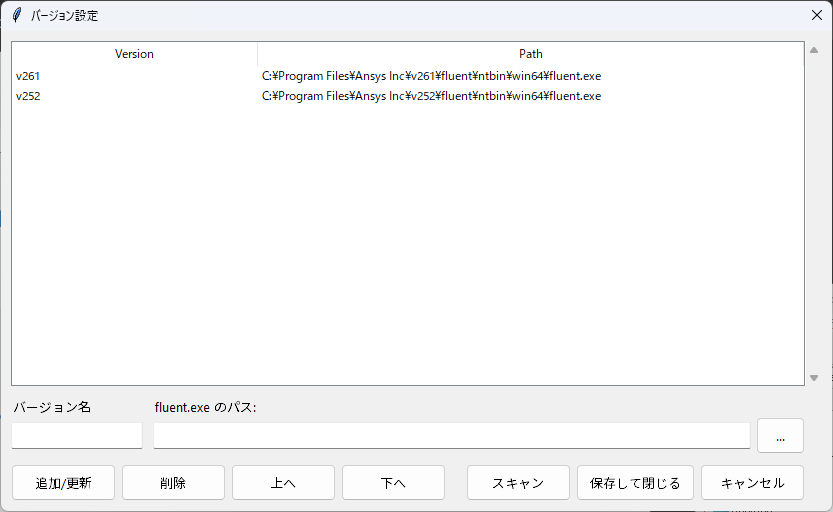
The settings dialog lets you manage detected versions in a list.
Besides add, update, and delete, you can also reorder them with the Up and Down buttons, so frequently used versions can stay near the top.
That makes the tool more practical for real workflows instead of forcing you to use the raw scan order.
What the Code Is Actually Doing
The main launchers are split into three files:
Fluent_Launcher_from_md.pySpaceClaim_Launcher.pyWorkbench_Launcher.py
Shared logic is moved into launcher_common.py.
Shared Logic: Config Storage and Settings Dialog
The config storage location is decided by config_base_dir() in launcher_common.py.
def config_base_dir() -> Path:
    base = app_base_dir()
    if not getattr(sys, "frozen", False):
        return base

    appdata = os.environ.get("APPDATA")
    if appdata:
        candidate = Path(appdata) / "AnsysLaunchers"
When run as .py, the config is stored next to the script. When packaged as an EXE, it prefers %APPDATA%\AnsysLaunchers.
That split keeps development easy while also making the packaged app behave more cleanly.
The settings dialog itself is implemented as a reusable BaseSettingsDialog, and each launcher just provides its own scan callback.
ttk.Button(btn_frm, text="追加/更新", command=self.add_update).pack(side="left")
ttk.Button(btn_frm, text="削除", command=self.delete_item).pack(side="left", padx=(5, 0))
ttk.Button(btn_frm, text="上へ", command=lambda: self.move_item(-1)).pack(side="left", padx=(5, 0))
ttk.Button(btn_frm, text="下へ", command=lambda: self.move_item(1)).pack(side="left", padx=(5, 0))
ttk.Button(btn_frm, text="スキャン", command=self.scan_versions).pack(side="left", padx=(20, 0))
Because move_item() saves the reordered list instead of falling back to alphabetical order, it is easy to keep your preferred versions at the top.
Fluent: Build a Journal Based on File Type
For Fluent, launch behavior changes depending on the file extension.
The core of that logic is build_journal_for_file().
if base_ext in [".msh", ".msh.h5"]:
    cmds.append(f"/file/read-mesh \"{p}\"")
elif base_ext in [".cas", ".cas.h5"]:
    cmds.append(f"/file/read-case \"{p}\"")
elif base_ext in [".dat", ".dat.h5"]:
    cas_candidates = [
        filepath.with_name(f"{base_root}.cas"),
        filepath.with_name(f"{base_root}.cas.h5"),
    ]
That means:
.mshusesread-mesh.casusesread-case.datlooks for the matching.casfirst, then usesread-data
Then launch_fluent() writes a temporary .jou file and passes it to Fluent with -i.
with tempfile.NamedTemporaryFile(
    "w",
    delete=False,
    prefix="ansys_launcher_",
    suffix=".jou",
    encoding="utf-8",
    newline="\n",
) as tf:
    tf.write(journal_text)
    journal_path = tf.name

cmd.extend(["-i", journal_path])
This is what makes it possible to choose a version in the GUI and still have the correct file loading behavior happen automatically.
Fluent: Reflect 2D/3D, DP, and Process Count in Launch Arguments
Fluent also lets you define launch conditions directly in the GUI.
def resolve_mode(self) -> str:
    if self.product_var.get() == "meshing":
        return "3d"
    dim = self.dim_var.get()
    dp = self.dp_var.get()
    mode = dim
    if dp:
        mode += "dp"
    return mode
That return value is used directly in the launch arguments, and process count is appended with -t.
if n_procs > 1:
    cmd.append("-t" + str(n_procs))
SpaceClaim / Workbench: Keep Launch Logic Minimal
SpaceClaim and Workbench intentionally avoid the heavier logic Fluent needs.
They pass only the arguments necessary to open the selected file in the selected version.
SpaceClaim:
cmd = [exe]
if filepath:
    cmd.append(filepath)
Workbench:
cmd = [exe]
if filepath:
    cmd.extend(["-F", filepath])
Both are designed around a single priority: make sure the intended version opens the file.
Version Detection Strategy
Rather than trying to detect everything automatically in a clever way, I prioritized reliably finding common install locations first.
For example, Fluent checks typical paths like this:
C:\Program Files\ANSYS Inc\v252\fluent\ntbin\win64\fluent.exe
SpaceClaim and Workbench follow the same idea.
And if detection does not work, you can register the executable manually in the settings dialog.
That is a deliberate tradeoff: less clever, but easier to trust and fix in real environments.
The actual detection logic is very direct.
For example, Fluent looks for v***\fluent\ntbin\win64\fluent.exe.
exe = vdir / "fluent" / "ntbin" / "win64" / "fluent.exe"
if exe.exists():
    found[vdir.name] = str(exe)
Workbench looks for RunWB2.exe or ansyswb.exe, while SpaceClaim looks for SpaceClaim.exe or SCDM.exe.
If detection misses a local variation, the manual registration path remains available.
Why Fluent Has More Logic Than the Others
Fluent is the most involved of the three because it needs more than a plain executable launch.
Depending on the file type, it needs to decide how to load:
.mshviaread-mesh.casviaread-case.datby finding a matching.casfirst when possible, thenread-data
So the launch-time journal generation is doing real work.
I also chose not to delete temporary .jou files immediately.
If the parent process removes them too early, Fluent may fail depending on timing.
Instead, cleanup_old_journals() removes only launcher-generated journals older than 48 hours the next time the launcher runs.
That is not flashy, but it is the kind of detail that matters if the tool is meant to be stable in practice.
How to Use It
Run as Python Scripts
Each script can be launched directly.
py -3 .\Fluent_Launcher_from_md.py
py -3 .\SpaceClaim_Launcher.py
py -3 .\Workbench_Launcher.py
You can also pass a file path as an argument.
py -3 .\Fluent_Launcher_from_md.py D:\work\sample.cas.h5
py -3 .\SpaceClaim_Launcher.py D:\cad\part.scdoc
py -3 .\Workbench_Launcher.py D:\project\model.wbpj
In practice, this is most useful when combined with file associations or context-menu workflow.
If you insert one explicit version-selection step before launch, it becomes much harder to open an older file in the wrong version by accident.
First Launch Behavior
If there is no config file on first launch, the tool scans common install paths.
If detection succeeds, the result is saved to JSON automatically.
After that, the basic flow is:
- choose a registered version
- fix or add versions in settings if necessary
- choose a file and launch
How to Build EXEs
The tool is designed to support single-file EXE packaging with PyInstaller.
Normal build:
.\build_all_exe.ps1
Clean build:
.\build_all_exe.ps1 -Clean
As described in the README, this produces:
FluentVersionSelector.exeSpaceClaimVersionSelector.exeWorkbenchVersionSelector.exe
The build script is intended to install PyInstaller only if it is missing, so it avoids doing unnecessary setup work every time.
When packaged as EXEs, the config location switches to %APPDATA%\AnsysLaunchers, which keeps packaged settings separate from direct script execution.
Also, the launcher icons were created with generative AI.
The tool itself is small and utilitarian, but I still wanted the packaged launchers to be visually distinguishable so Fluent, SpaceClaim, and Workbench are easier to tell apart.
Final Thoughts
I built this because, in my own environment, version selection for Ansys products was not always behaving the way I expected, and I wanted a more explicit way to control which version opened a file.
On top of that, when a newer version is set as the default app, it becomes too easy to open an older simulation file in that newer version and save over it unintentionally.
So I made a small launcher that forces a version choice before launch.
It is a modest tool, but in multi-version environments it is genuinely practical.
If you have ever felt uneasy about opening Fluent or Workbench files in the wrong release, even a small layer like this can make the workflow safer.
Related Posts
- How to Automatically Download the Right ChromeDriver for Selenium with Python
- Ryzen 5 7600 and RTX 4070 Super PC Build: Parts, Price, and Why I Chose Them
Ansys, Ansys Fluent, Ansys SpaceClaim, and Ansys Workbench are trademarks or registered trademarks of Ansys, Inc. or its affiliates. This article describes an unofficial third-party tool.